If your resume “looks perfect” but you keep seeing instant rejections or radio silence, the issue often isn’t your experience—it’s how your resume is processed and searched.
Two realities can be true at once:
- Many companies use ATS software to collect, parse, and organize applications at scale.
- Recruiters still make human decisions fast—one classic eye-tracking study found recruiters spent 7.4 seconds on an initial resume screen. (Source: The Ladders Eye-Tracking Study PDF, 2018: https://www.theladders.com/static/images/basicSite/pdfs/TheLadders-EyeTracking-StudyC2.pdf)
So “optimizing for Greenhouse ATS” isn’t about gaming a robot. It’s about making sure:
- Greenhouse can parse your resume cleanly, and
- Recruiters can find you quickly via keyword searches, and
- Your resume reads clearly to a human in seconds.
In this guide, you’ll learn:
- What Greenhouse ATS actually does (and what it doesn’t)
- The exact formatting rules that prevent parsing failures
- A step-by-step method to extract and place the right keywords
- Greenhouse-specific pitfalls (file types, “unsuccessful parse,” knock-out questions)
- Resume examples you can copy (summaries, skills, bullets)
- Tools to speed up tailoring—without keyword stuffing
What Is Greenhouse ATS (from a Job Seeker’s Perspective)?
Greenhouse is an Applicant Tracking System (ATS) used by employers to manage hiring workflows: collecting applications, storing resumes, and helping recruiters search, review, and move candidates through stages.
Important: Greenhouse isn’t “grading” you the way many people think
A lot of ATS myths come from the idea that software automatically “rejects” resumes based on some hidden score.
For Greenhouse specifically, there’s strong evidence that:
- Recruiters can search resumes for keywords inside Greenhouse. (Source: Greenhouse Support — “Search resumes for keywords”: https://support.greenhouse.io/hc/en-us/articles/115004600186-Search-resumes-for-keywords)
- Greenhouse can use auto-rejection rules based on application question answers (often called knock-out questions), not “resume keyword scores.” (Source: Greenhouse Support — “Auto-reject”: https://support.greenhouse.io/hc/en-us/articles/360000653472-Auto-reject)
- Greenhouse’s candidate-facing education site explains that auto-rejection is based on specific recruiter-controlled rules (commonly tied to questions), and that AI doesn’t “rank you” in a simplistic way. (Source: MyGreenhouse blog — “What really happens after you apply for a job?”: https://my.greenhouse.com/blogs/what-really-happens-after-you-apply-for-a-job)
Practical takeaway: Your goal is to (1) avoid parsing errors and (2) match the language recruiters will search for.
Why Greenhouse ATS Optimization Matters in 2026 (With Data)
1) ATS usage is widespread
Multiple industry sources estimate extremely high ATS adoption among large employers.
- HiringThing states over 98% of Fortune 500 companies utilize ATS. (Source: HiringThing ATS stats: https://blog.hiringthing.com/2024-applicant-tracking-system-stats)
- SelectSoftwareReviews reports ATS usage figures such as ~70% of large companies using an ATS and frequently cites near-universal Fortune 500 adoption. (Source: SelectSoftwareReviews ATS statistics: https://www.selectsoftwarereviews.com/blog/applicant-tracking-system-statistics)
Confidence: Medium–High (figures vary by study, but the direction is consistent across multiple domains).
2) Recruiters move fast
As noted above, The Ladders’ eye-tracking research found an average initial resume screen of 7.4 seconds.
(Source PDF: https://www.theladders.com/static/images/basicSite/pdfs/TheLadders-EyeTracking-StudyC2.pdf)
Confidence: High (primary PDF source).
3) Parsing problems can literally break your application
Greenhouse explicitly documents that resumes can fail to parse due to:
- File too large
- Fake resumes
- Resume formatting issues
(Source: Greenhouse Support — “Unsuccessful resume parse”: https://support.greenhouse.io/hc/en-us/articles/200989175-Unsuccessful-resume-parse)
Confidence: High (official Greenhouse support).
4) File type requirements are real (and generous—but don’t get sloppy)
Greenhouse states candidates can upload doc, docx, pdf, rtf, and txt files up to 100 MB.
(Source: Greenhouse Support — “Supported formats for resumes, cover letters and other candidate uploads”: https://support.greenhouse.io/hc/en-us/articles/360052218132-Supported-formats-for-resumes-cover-letters-and-other-candidate-uploads)
Confidence: High (official Greenhouse support).
5) Hiring tech is still growing
For broader context, Fortune Business Insights reported North America held 28.43% market share in 2024 in the applicant tracking system market.
(Source: Fortune Business Insights ATS market page: https://www.fortunebusinessinsights.com/applicant-tracking-system-market-108826)
Confidence: Medium (market reports are credible but paywalled details can limit verification).
How to Optimize Resume for Greenhouse ATS: Step-by-Step
Step 1: Start with Greenhouse’s “Parsing First” Mental Model
Before keywords, understand the pipeline:
- You upload a resume (PDF/DOCX/etc.).
- Greenhouse tries to parse it into fields (name, experience, education, etc.).
- Recruiters view the resume as submitted and/or use parsed fields/search to filter candidates.
- Recruiters can run keyword searches across resumes. (Source: https://support.greenhouse.io/hc/en-us/articles/115004600186-Search-resumes-for-keywords)
Optimization goal: Make your resume easy to parse and easy to search.
Step 2: Use a “Greenhouse-Safe” Resume Format (No Parsing Traps)
Greenhouse doesn’t publish a “perfect resume template,” but it does document what can break parsing.
Greenhouse-confirmed parsing risk factors
Greenhouse’s “Unsuccessful resume parse” article calls out formatting issues and also warns about:
- Resumes uploaded as an image rather than a document (e.g., image-based PDFs)
- Complex formatting (tables/headers/footers are commonly cited as parser pain points across ATS guidance)
Source: https://support.greenhouse.io/hc/en-us/articles/200989175-Unsuccessful-resume-parse
University career centers echo the same traps
- Santa Clara University explicitly warns that ATS systems typically do not read headers and footers reliably and emphasizes simple formatting.
(Source: SCU — “Common ATS Resume Formatting Mistakes”: https://www.scu.edu/careercenter/toolkit/job-scan-common-ats-resume-formatting-mistakes/) - UIC’s career services PDF recommends simple formatting and warns against headers/footers, templates, and other elements that can confuse ATS parsing.
(Source PDF: https://careerservices.uic.edu/wp-content/uploads/sites/26/2017/08/Ensure-Your-Resume-Is-Read-ATS.pdf)
Confidence: High (multiple higher-ed sources + Greenhouse’s own parsing-failure documentation).
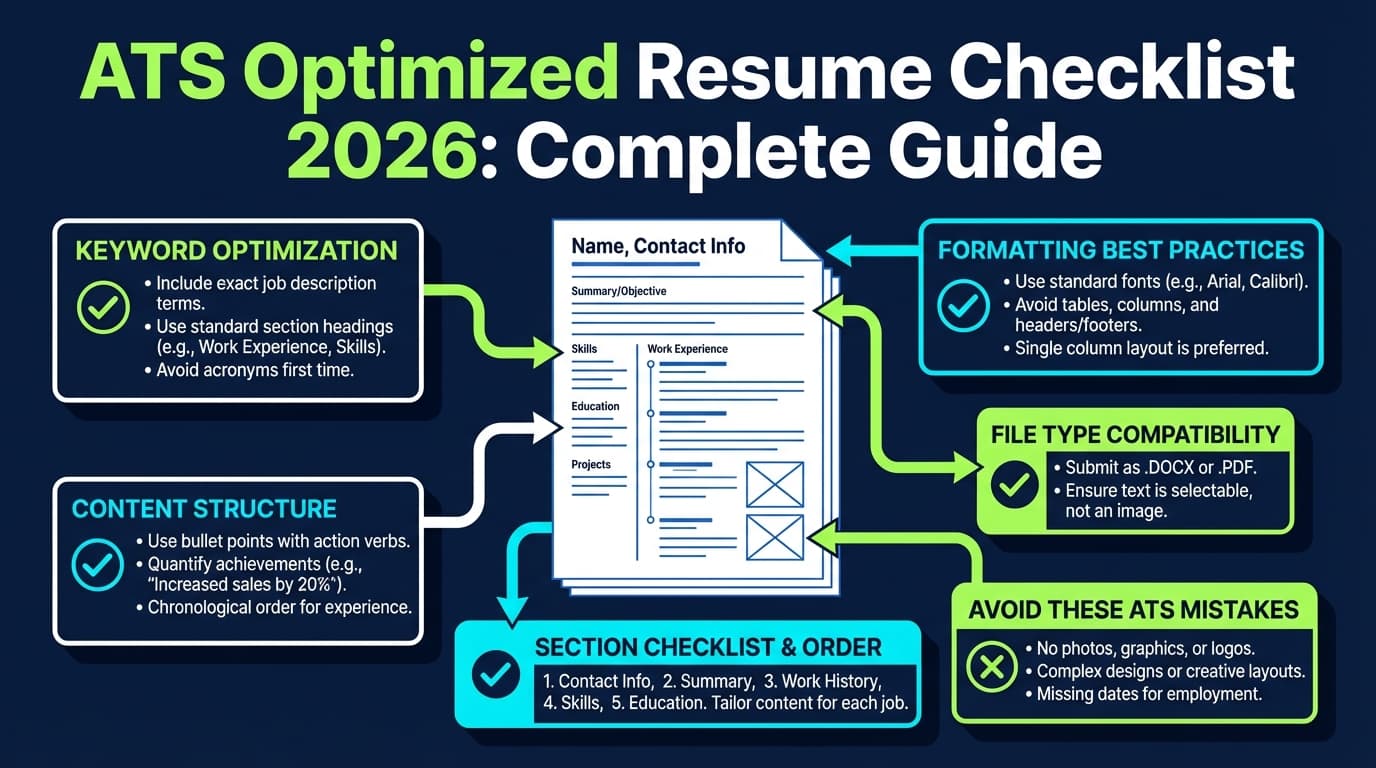
Greenhouse-safe formatting checklist (copy/paste)
Use this as your baseline:
- One column layout
- No text boxes
- No tables
- No icons/logos
- No charts
- No header/footer for critical info (name, email, phone)
- Standard fonts (e.g., Calibri, Arial, Times New Roman)
- Clear section headings:
- Summary
- Skills
- Experience
- Education
- Certifications (if applicable)
Pro tip: If your resume is two columns because it “looks better,” create a one-column ATS version for applications—and keep the designed version for networking or portfolios.
Step 3: Choose the Right File Type for Greenhouse (PDF vs DOCX)
Greenhouse accepts doc, docx, pdf, rtf, txt up to 100 MB.
(Source: https://support.greenhouse.io/hc/en-us/articles/360052218132-Supported-formats-for-resumes-cover-letters-and-other-candidate-uploads)
So what should you submit?
Practical guidance (industry consensus)
- DOCX can parse more reliably across many systems, but formatting can shift.
- PDF preserves formatting, but can fail if it’s image-based or exported poorly.
Because Greenhouse supports both, your decision should be based on which one produces cleaner parsing for your file.
Quick test you can do today:
- Export a PDF.
- Open it and try selecting text in each section.
- If you can’t highlight/copy text cleanly, it may be image-based → higher parse risk.
- Export a DOCX.
- Check that bullets, spacing, and headings remain clean.
Greenhouse-specific pitfall: “Pretty” PDFs created via design tools can embed text in odd ways. If you used Canva/Figma/InDesign, be extra cautious.
Step 4: Build a Keyword Map That Matches How Recruiters Search in Greenhouse
Greenhouse enables searching resumes for keywords.
(Source: https://support.greenhouse.io/hc/en-us/articles/115004600186-Search-resumes-for-keywords)
That means your optimization should mirror recruiter behavior:
4A) Extract keywords from the job description (the right way)
Copy the job description into a doc and pull out:
- Hard skills / tools (software, languages, platforms)
- Core responsibilities (verbs + objects)
- Role-specific nouns (deliverables)
- Must-have qualifications (years, certifications, domains)
Then cluster them:
| Keyword Cluster | Examples |
|---|---|
| Tools | SQL, Python, Tableau, Salesforce, HubSpot |
| Methods | A/B testing, regression, stakeholder management |
| Deliverables | dashboards, ETL pipelines, go-to-market plans |
| Role terms | data analyst, product marketing manager, program manager |
4B) Identify “Greenhouse-searchable” phrases
Recruiters don’t always search single words. They search recognizable phrases:
- “customer segmentation”
- “SOC 2”
- “pipeline forecasting”
- “React”
- “GDPR”
- “OKRs”
Pro tip: Keep the exact phrasing from the job post where it’s honest. If the job says “stakeholder management,” don’t replace it with “cross-functional collaboration” everywhere—use both.
Step 5: Place Keywords Where They Actually Matter (Without Stuffing)
A clean keyword strategy is distribution + context, not repetition.
Best keyword placement zones
- Title line (top third):
- “Data Analyst | SQL, Python, Tableau | Experimentation”
- Summary (2–4 lines)
- Skills (clean list)
- Experience bullets (most powerful)
- Projects (especially for career switchers)
A safe “keyword density” rule of thumb
Instead of chasing “100% match,” aim for:
- Most core tools/skills appear at least once
- Each appears in a credible context (a bullet or project)
Why not chase 100%? Because keyword stuffing looks fake to humans—and doesn’t prove competence.
Step 6: Write Greenhouse-Friendly Section Headings (So Parsing Doesn’t Mislabel You)
Parsing systems tend to perform better with conventional headings.
Use exactly these where possible:
- Professional Summary
- Skills
- Professional Experience
- Education
- Certifications
Avoid creative headings like:
- “My Journey”
- “Where I’ve Made Impact”
- “Toolbox”
- “What I Bring”
They may parse incorrectly, and they slow down a recruiter scanning in seconds.
Step 7: Fix the #1 Greenhouse Reality: Recruiters Often Review Fast, Then Search
Greenhouse’s own content emphasizes that keywords help recruiters move faster, even when humans review.
(Source: Greenhouse blog — “How to get the job, faster (part 1)”: https://www.greenhouse.com/blog/how-to-get-the-job-faster-part-1-6-ways-to-stand-out-in-a-crowded-job-market)
Translation: Your resume needs both:
- a “human skim layer” (clear, quantified impact)
- a “search layer” (role terms + tools + domain keywords)
The “7.4-second skim” layout (steal this)
Top half of page 1 should show:
- Your role target + specialty
- 2–3 standout achievements (numbers)
- Core tools/skills list (short)
- Most recent role with impact bullets
Step 8: Bullet Optimization: Use the “Verb + Scope + Tool + Result” Formula
This bullet structure does two things:
- reads clearly to humans
- naturally embeds keywords for search
Template:
Verb + what you did (scope) + using (tools/methods) + result metric
Before (weak):
- Responsible for reporting and dashboards.
After (Greenhouse-searchable + human-friendly):
- Built Tableau dashboards for weekly pipeline forecasting, reducing reporting time by 30% for Sales Ops.
Before (keyword-missing):
- Worked on data pipelines.
After:
- Developed ETL pipelines in Python + SQL to automate data ingestion for customer segmentation, improving model refresh cadence from monthly to weekly.
Step 9: Don’t Get Auto-Rejected: Treat Application Questions Like a Separate Gate
Greenhouse supports auto-rejection rules based on application question answers.
(Source: Greenhouse Support — “Auto-reject”: https://support.greenhouse.io/hc/en-us/articles/360000653472-Auto-reject)
MyGreenhouse also discusses recruiter-controlled auto-rejection rules.
(Source: https://my.greenhouse.com/blogs/what-really-happens-after-you-apply-for-a-job)
What this means for you: Even a perfect resume won’t help if you fail a knock-out question like:
- Work authorization
- Location requirement
- Required certification
- Minimum years of experience
- Willingness to work shift/weekends
Action steps:
- Screenshot the job posting requirements before applying (posts change).
- If a requirement is truly missing, decide whether to apply anyway—but know the risk.
- If you do meet it, make sure your resume supports it (e.g., “PMP” appears under Certifications).
Step 10: Validate Your Resume Like a Recruiter Would
Do these 3 tests:
Test A: Copy/paste test (parsing proxy)
- Copy your resume text from the PDF into a plain text editor.
- If the order becomes scrambled (columns/tables), fix formatting.
Test B: Keyword “Find” test
- Paste the job description into a doc.
- Highlight 15–25 key terms.
- Use search (Ctrl/Cmd+F) in your resume:
- Are the most important 10–15 present at least once?
Test C: 10-second skim test
Show your resume to a friend and ask:
- “What role am I targeting?”
- “What tools do I use?”
- “What did I accomplish—numbers?”
If they can’t answer quickly, the recruiter won’t either.
Greenhouse-Specific Best Practices (Beyond Generic ATS Advice)
1) Stay within Greenhouse’s supported upload formats and avoid “image resumes”
Greenhouse supports doc/docx/pdf/rtf/txt up to 100 MB.
(Source: https://support.greenhouse.io/hc/en-us/articles/360052218132-Supported-formats-for-resumes-cover-letters-and-other-candidate-uploads)
Greenhouse also flags image-based or problematic resumes as likely to parse poorly.
(Source: https://support.greenhouse.io/hc/en-us/articles/200989175-Unsuccessful-resume-parse)
Best practice: Export from Word/Google Docs or a proven resume builder. Avoid exporting from design tools unless you know how to keep text machine-readable.
2) Optimize for “searchability,” not just “readability”
Because Greenhouse enables keyword search, your resume should include:
- your target role name (exactly)
- tools (exactly)
- domain keywords (exactly)
(Source: https://support.greenhouse.io/hc/en-us/articles/115004600186-Search-resumes-for-keywords)
3) Use both acronyms and spelled-out forms (when relevant)
Recruiters might search:
- “SEO” or “Search Engine Optimization”
- “GTM” or “Go-to-market”
- “SOC2” or “SOC 2”
How to do it without clutter:
- Put the full term once, with acronym:
“Search Engine Optimization (SEO)” - Then use the acronym later.
Common Mistakes to Avoid (That Hurt Greenhouse Parsing or Search)
Mistake 1: Using tables, columns, headers, or footers for key info
This is repeatedly flagged across ATS guidance, including university career centers.
Sources:
- SCU: https://www.scu.edu/careercenter/toolkit/job-scan-common-ats-resume-formatting-mistakes/
- UIC PDF: https://careerservices.uic.edu/wp-content/uploads/sites/26/2017/08/Ensure-Your-Resume-Is-Read-ATS.pdf
Fix: Put contact info in the main body at the top.
Mistake 2: Submitting an image-based PDF
Greenhouse explicitly warns that image resumes can cause parsing failures.
(Source: https://support.greenhouse.io/hc/en-us/articles/200989175-Unsuccessful-resume-parse)
Fix: Re-export from a text-based source (Docs/Word/resume builder). Confirm you can select/copy text.
Mistake 3: Keyword stuffing (especially in Skills)
Stuffing can backfire because:
- it looks fake to humans
- it dilutes the signal of what you’re actually good at
Fix: Put keywords into achievement bullets with tools + outcomes.
Mistake 4: Hiding important keywords in a “Tools” sidebar or design elements
If it’s in a column or graphic, it may not parse well—and may not be searchable.
Fix: Keep Skills as a simple list in the main flow.
Mistake 5: Ignoring application questions
Greenhouse auto-reject rules can be tied to answers.
(Source: https://support.greenhouse.io/hc/en-us/articles/360000653472-Auto-reject)
Fix: Treat questions as a separate screening layer.
Resume Examples (Greenhouse-Optimized)
Example 1: Summary (Data/Analytics)
Data Analyst with 5+ years in SQL and Python, building Tableau dashboards and automated reporting for Sales and Product teams. Led A/B testing and customer segmentation initiatives, improving conversion by 12% and reducing weekly reporting time by 30%.
Why it works:
- Includes role title + core tools + domain keywords
- Includes quantified wins for the 7-second skim
Example 2: Skills Section (simple + searchable)
Skills: SQL, Python, Tableau, Looker, Excel, dbt, Snowflake, A/B Testing, Experiment Design, Stakeholder Management, KPI Reporting, Data Modeling
Why it works:
- Single line, no columns/tables
- Mix of tools + methods + role terms
Example 3: Experience Bullets (Product/Marketing)
- Owned go-to-market (GTM) launch strategy for new feature set; partnered with Product and Sales to drive 15% increase in activation.
- Built HubSpot lifecycle email automation and improved lead-to-MQL conversion by 18%.
- Conducted competitive analysis and positioning refresh; produced messaging framework used across website, deck, and SDR scripts.
Example 4: “Keyword Bridging” (when your past title doesn’t match)
If your title was “Operations Associate” but you’re applying for “Project Coordinator,” add a clarifier:
Operations Associate (Project Coordination Focus)
Then your bullets should include the coordinator language:
- Coordinated timelines, stakeholders, and deliverables across 6 concurrent projects…
This keeps honesty while matching recruiter search behavior.
Tools to Help With Greenhouse ATS Optimization
1) JobShinobi (Resume analysis + job matching + LaTeX resume builder)
If you want a workflow for tailoring to a specific job description (instead of guessing keywords), JobShinobi includes:
- AI resume analysis with ATS-focused scoring and feedback
- Job description extraction (URL or pasted text) and resume-to-job matching (keyword gaps, suggestions)
- A LaTeX resume editor with PDF export (useful if you want consistent structure)
- A job tracker that can log applications—JobShinobi’s email-forwarding automation requires a Pro membership
Pricing (confirmed): JobShinobi Pro is $20/month or $199.99/year. The pricing page mentions a “7-day free trial,” but trial mechanics are not clearly verifiable from code, so treat that as unconfirmed.
Internal links: /pricing, /login, /subscription
When it’s especially helpful:
- You’re applying to many roles and need a repeatable “keyword gap → bullet rewrite” process.
2) Greenhouse candidate guidance (official)
For understanding what happens after you apply and what recruiters control:
- MyGreenhouse candidate education: https://my.greenhouse.com/blogs/what-really-happens-after-you-apply-for-a-job
3) University ATS formatting checklists (free, practical)
- UIC ATS PDF: https://careerservices.uic.edu/wp-content/uploads/sites/26/2017/08/Ensure-Your-Resume-Is-Read-ATS.pdf
- SCU formatting mistakes list: https://www.scu.edu/careercenter/toolkit/job-scan-common-ats-resume-formatting-mistakes/
Key Takeaways (Greenhouse ATS Resume Optimization)
- Greenhouse optimization = parsing + searchability + human skim.
- Greenhouse supports doc/docx/pdf/rtf/txt up to 100 MB, but formatting choices still affect parsing.
(Source: https://support.greenhouse.io/hc/en-us/articles/360052218132-Supported-formats-for-resumes-cover-letters-and-other-candidate-uploads) - Greenhouse documents “unsuccessful resume parse” causes—avoid image resumes and complex formatting.
(Source: https://support.greenhouse.io/hc/en-us/articles/200989175-Unsuccessful-resume-parse) - Recruiters can search resumes for keywords in Greenhouse, so include the terms they’ll use.
(Source: https://support.greenhouse.io/hc/en-us/articles/115004600186-Search-resumes-for-keywords) - Don’t ignore application questions—Greenhouse supports auto-reject rules based on answers.
(Source: https://support.greenhouse.io/hc/en-us/articles/360000653472-Auto-reject)
FAQ (People Also Ask / Candidate Questions)
How do you optimize a resume for Greenhouse ATS?
Use a simple, single-column resume; avoid headers/footers, tables, and graphics; submit a text-based PDF or DOCX; and mirror the job description’s keywords in your Summary, Skills, and Experience bullets—so Greenhouse can parse it and recruiters can search it.
Does Greenhouse ATS automatically reject resumes?
Greenhouse can be configured to auto-reject candidates based on rules tied to application question answers (knock-out questions).
(Source: https://support.greenhouse.io/hc/en-us/articles/360000653472-Auto-reject)
Candidate-facing guidance also notes recruiter-controlled rules for auto-rejection. (Source: https://my.greenhouse.com/blogs/what-really-happens-after-you-apply-for-a-job)
Does Greenhouse rank candidates by keyword score?
Greenhouse supports keyword searching of resumes (Source: https://support.greenhouse.io/hc/en-us/articles/115004600186-Search-resumes-for-keywords), but common candidate guidance emphasizes that simplistic “ATS scores” are often misunderstood. Focus on being parseable and searchable, then readable to humans.
What file type is best for Greenhouse: PDF or DOCX?
Greenhouse supports both PDF and DOCX (plus doc/rtf/txt).
(Source: https://support.greenhouse.io/hc/en-us/articles/360052218132-Supported-formats-for-resumes-cover-letters-and-other-candidate-uploads)
Choose the one that stays text-based and parses cleanly. Avoid image-based PDFs.
Why did my Greenhouse application parse incorrectly?
Greenhouse documents that parsing can fail due to file size, fake resumes, or formatting issues.
(Source: https://support.greenhouse.io/hc/en-us/articles/200989175-Unsuccessful-resume-parse)
The most common fix is simplifying formatting and ensuring the resume is text-based.
What formatting should I avoid for Greenhouse ATS?
Avoid tables, multi-column layouts, text boxes, graphics, and putting contact info in headers/footers. Multiple career centers warn ATS often struggles with headers/footers and complex layouts.
Sources:
- https://www.scu.edu/careercenter/toolkit/job-scan-common-ats-resume-formatting-mistakes/
- https://careerservices.uic.edu/wp-content/uploads/sites/26/2017/08/Ensure-Your-Resume-Is-Read-ATS.pdf
How can I improve my ATS “match rate” without keyword stuffing?
Use a keyword map: extract role terms/tools from the job description, then place them in:
- your headline/summary
- a clean Skills list
- achievement bullets with context + results
This improves searchability and credibility at the same time.
How long do recruiters spend looking at a resume?
One well-known eye-tracking study reported an average initial screen of 7.4 seconds.
(Source PDF: https://www.theladders.com/static/images/basicSite/pdfs/TheLadders-EyeTracking-StudyC2.pdf)
What’s the biggest Greenhouse-specific mistake candidates make?
Ignoring the application questions. Even with a strong resume, knock-out question rules can trigger auto-rejection depending on company configuration.
(Source: https://support.greenhouse.io/hc/en-us/articles/360000653472-Auto-reject)
Optional Next Step: A Simple 15-Minute Greenhouse Optimization Sprint
- Remove columns/tables/headers/footers (5 min)
- Add a 2–3 line summary with role title + 2 tools + 1 result (3 min)
- Add a Skills line with 10–14 job-relevant keywords (3 min)
- Rewrite your top 2 bullets using “Verb + Tool + Result” (4 min)
If you do only that, you’ll usually see a measurable improvement in both parsing safety and recruiter skim clarity.