Recruiters are skimming fast: one widely cited eye-tracking study found recruiters spent about 7.4 seconds on an initial resume screen. (Source: HR Dive coverage of The Ladders eye-tracking study: https://www.hrdive.com/news/eye-tracking-study-shows-recruiters-look-at-resumes-for-7-seconds/541582/)
If you’re a student, that can feel unfair—because your experience is real, it’s just not always labeled “Job Title, 3 years.” The good news: with the right structure, a clean (ATS-friendly) format, and a few careful AI prompts, you can build a strong resume even with limited work history.
In this guide, you’ll learn:
- How to build a student resume step by step using free or low-cost tools
- The sections that matter most when you have little/no experience (projects, coursework, volunteering)
- A repeatable set of copy/paste AI prompts that produce better bullets (and fewer “AI-sounding” lines)
- An ATS formatting checklist so your resume doesn’t get scrambled
Note on “free”: Many “free resume builders” let you start for free but charge to download, remove watermarks, or export certain formats. This guide includes truly free options (like open-source builders) plus a workflow you can do with free tools.
What is a “free AI resume builder” for students?
A free AI resume builder is any tool (or tool stack) that helps you write and format a resume using AI—without requiring payment to create a usable resume.
In practice, students usually combine:
- A resume template (Google Docs / Word / open-source builder)
- An AI writing assistant (to generate bullet points, rewrite wording, tailor to a job description)
- A basic ATS sanity check (to ensure your format is readable and your keywords match)
The goal isn’t to “let AI write your whole resume.” It’s to:
- Turn messy notes into clear bullets
- Match your resume language to the internship/job posting
- Keep formatting simple so ATS systems can parse it
Why this matters in 2026 (ATS + AI are everywhere)
A few trends make “resume + AI + ATS” a big deal right now:
-
ATS is extremely common at large employers.
Jobscan reports that around 98% of Fortune 500 companies use some form of ATS (as cited in Forbes, referencing Jobscan). Source: https://www.forbes.com/councils/forbescoachescouncil/2024/04/08/outsmarting-the-ats-key-facts-every-job-seeker-should-know-today/ -
Competition is intense for many corporate roles and internships.
Recruiter.com (citing Glassdoor research) notes that a corporate job opening attracts an average of 250 resumes, with only 4–6 candidates interviewed. Source: https://www.recruiter.com/recruiting/these-statistics-will-change-the-way-you-apply-to-jobs/ -
AI is now part of hiring workflows.
HireVue’s 2024 report says it surveyed 3,100 workers and 1,000 HR professionals globally. Source: https://www.hirevue.com/resources/report/ai-in-hiring-report
InfoWorld reports on the same research that 73% of HR professionals trust AI to make candidate recommendations. Source: https://www.infoworld.com/article/2516324/hiring-managers-trust-ai-recommendations.html -
Formatting still matters (a lot).
UIC Career Services advises ATS-friendly resumes should be single column and avoid tables, multiple columns, and text boxes. Source (PDF): https://careerservices.uic.edu/wp-content/uploads/sites/26/2017/08/Ensure-Your-Resume-Is-Read-ATS.pdf -
Universities are explicitly addressing AI usage.
Harvard’s career services includes guidance on using AI to write or edit documents—emphasizing your materials should authentically represent you. Source: https://careerservices.fas.harvard.edu/resources/create-a-strong-resume/
Bottom line: a student resume works best when it’s (1) skimmable, (2) keyword-aligned, and (3) clearly proves you can do the work—even if your experience came from projects, clubs, labs, volunteering, or part-time jobs.
How to use a free AI resume builder for students (step by step)
Step 0: Pick a “free” workflow that won’t trap you behind a paywall
Here are three student-friendly paths:
Path A (simple + reliable): Google Docs + AI prompts (recommended)
- Use a clean Google Docs resume template (free)
- Use an AI assistant to draft/rewrite bullets (free/limited)
- Export to PDF or DOCX
Path B (truly free + open-source): OpenResume (builder) + AI prompts
- Use OpenResume’s builder (free, open-source)
- Keep formatting standardized
- Use AI to improve bullets and tailor
OpenResume is described as free and open-source on its site, and its GitHub repo is here: https://github.com/xitanggg/open-resume
(Always review privacy and data handling for any tool you use.)
Path C (power-user resume optimization): builder + ATS analysis + tailoring
- Build the resume in a clean format
- Run an ATS-style analysis + job match
- Iterate quickly
If you want an all-in-one tool for building and iterating, JobShinobi is an option—but it’s not a free resume builder. JobShinobi includes a LaTeX-based resume editor with PDF compilation plus AI resume analysis and job matching/tailoring workflows. JobShinobi Pro is $20/month or $199.99/year, and the pricing page mentions a 7-day free trial (trial mechanics are not clearly verifiable in code, so treat that as “mentioned,” not guaranteed).
Step 1: Gather your raw material (15 minutes)
Before you touch a template or AI tool, collect this:
Education
- School, degree, major/minor, graduation date (or expected)
- GPA (optional; include if strong and relevant)
- Relevant coursework (only if it supports the target role)
Experience (yes, you have some)
- Part-time jobs
- Volunteer roles
- Campus jobs
- Research/lab work
- Leadership in clubs
- Class projects, capstone, hackathons
- Freelance / small business / content creation
- Athletics (especially leadership + time management)
Skills
- Hard skills (tools, languages, software)
- Role skills (analysis, research, lab techniques, design tools)
- A few credible soft skills (team leadership, stakeholder communication)
Proof links
- Portfolio
- GitHub
- Personal site
- Project demos
Pro tip: Put everything in a “master doc” first. Your resume is the curated version.
Step 2: Choose the right student resume format (10 minutes)
Most students do best with a reverse-chronological or hybrid format:
- Reverse-chronological: Education + experience in time order
- Hybrid: Skills summary + projects + experience (great when your “experience” is project-heavy)
Keep it one page (usually).
Boston College’s career center states: “For nearly all students, the résumé you submit for any job or internship will be one side of one page.” Source: https://www.bc.edu/bc-web/offices/studentaffairs/sites/careers/prepare/resume.html
Step 3: Start from a clean ATS-friendly template (10 minutes)
An ATS-friendly template typically has:
- Single column
- Clear section headings (Education, Experience, Projects, Skills)
- Standard fonts
- No icons/logos in headers
- Minimal lines/graphics
UIC’s ATS guidance explicitly recommends a single-column format and avoiding tables, multiple columns, or text boxes. Source: https://careerservices.uic.edu/wp-content/uploads/sites/26/2017/08/Ensure-Your-Resume-Is-Read-ATS.pdf
Easy free template sources:
- Your university career center templates (often the best)
- Google Docs basic resume templates
- Harvard’s resume resources hub (example page): https://careerservices.fas.harvard.edu/resources/create-a-strong-resume/
Step 4: Use AI the “right” way (so your resume doesn’t sound fake)
Harvard’s career guidance on AI emphasizes authenticity—use AI as support, not a substitute for your story. Source: https://careerservices.fas.harvard.edu/resources/create-a-strong-resume/
A strong rule of thumb:
- Use AI to transform inputs (notes → bullets, long → concise, generic → specific)
- Don’t use AI to invent experiences or metrics
Copy/paste AI prompt: Turn notes into a bullet that proves impact
Paste this into your AI tool, then paste your notes:
Prompt:
You are a career advisor. Convert the notes below into 2–3 resume bullets for a student applying to [ROLE].
Requirements:
- Start each bullet with a strong action verb
- Include tools/skills used
- Add measurable outcomes only if supported by the notes
- Keep each bullet under 2 lines
Notes:
[PASTE YOUR NOTES]
Copy/paste AI prompt: Make bullets less “AI-sounding”
Prompt:
Rewrite these bullets to sound natural and specific. Remove buzzwords like “synergy,” “dynamic,” “leveraged,” and “results-driven.” Keep meaning the same.
Bullets:
[PASTE BULLETS]
Copy/paste AI prompt: Tailor to a job description without keyword stuffing
Prompt:
Compare my resume bullets to the job description.
- List the top 10 skills/keywords from the job description.
- Identify which ones are missing from my resume.
- Suggest rewrites for up to 4 bullets to incorporate missing keywords only where accurate.
Resume: [PASTE BULLETS]
Job description: [PASTE JD]
Pro tip: When AI suggests a keyword, ask yourself: “Can I point to a project or class where I actually did this?” If not, skip it.
Step 5: Build your resume section-by-section (with examples)
Below is a student resume structure that works for internships and entry-level roles.
Student resume sections (what to include + examples)
1) Header (keep it clean)
Include:
- Name
- City, State (optional)
- Phone, email
- LinkedIn + portfolio/GitHub
Avoid:
- Full address (usually unnecessary)
- Two-column header tables
- Icons that may break parsing
2) Education (put it near the top as a student)
Example:
- University Name — B.S. in Computer Science, Expected May 2027
- GPA: 3.7/4.0 (optional)
- Relevant Coursework: Data Structures, Databases, Machine Learning, Operating Systems
When to include coursework:
Include it when it directly supports the role and you don’t have much directly related experience yet.
3) Skills (keep it scannable)
Split into categories:
- Technical: Python, SQL, Excel, Tableau
- Tools: Git, Figma, Google Analytics
- Core: Data analysis, user research, stakeholder communication
Pro tip: Don’t list 25 skills. List the ones you’d feel comfortable being interviewed on.
4) Projects (this is where students win)
Projects are often the fastest way to “prove” readiness.
Good project bullet pattern:
Action verb + what you built/did + tools + outcome
Example (Data/Analytics project):
- Built an Excel + SQL pipeline to clean and analyze 10,000+ rows of survey data; created a dashboard summarizing retention drivers for a mock product team
- Automated weekly reporting with Python scripts, reducing manual data prep time by ~40% (if true)
Example (Software project):
- Developed a React + Node.js web app for campus event discovery; implemented search and filtering and deployed a live demo
- Wrote unit tests for core features and fixed accessibility issues identified by Lighthouse audits
Example (Marketing project):
- Planned and executed a 4-week content campaign for a student org; tracked engagement in GA4 and presented recommendations to leadership
- Designed and A/B tested two email subject lines; improved open rate from X% to Y% (only if you have numbers)
5) Experience (yes, even if it’s not “career” experience)
Part-time and campus jobs are valuable if you translate them into transferable skills.
Example (Barista / Retail):
- Managed high-volume transactions while maintaining accuracy and customer satisfaction
- Trained 2 new team members on POS workflows and closing procedures
Example (Resident Assistant / Student Leader):
- Mediated resident concerns and coordinated events for a floor of 40+ students
- Communicated policy updates and resources, improving event attendance and participation
6) Leadership & Activities (optional, but powerful)
Include:
- Club leadership
- Competition teams
- Volunteer work
- Athletics
Keep it impact-based, not just “Member.”
How to tailor your student resume to each application (fast)
Tailoring doesn’t mean rewriting everything. It means you match:
- Your headline / target role
- 4–8 skills/keywords
- 1–2 project bullets
- Your skills section ordering
Mini tailoring workflow (10 minutes per job)
-
Paste the job description into your notes and extract:
- Role skills (technical + soft)
- Tools
- Responsibilities
-
Update:
- Skills order to mirror the job post
- Project bullets to include relevant tools/terms (truthfully)
- Resume title (optional): “Computer Science Student | Software Engineering Intern Candidate”
-
Run an ATS sanity check:
- Copy/paste your resume text into a plain text editor
- If sections scramble (dates move, titles reorder), simplify formatting
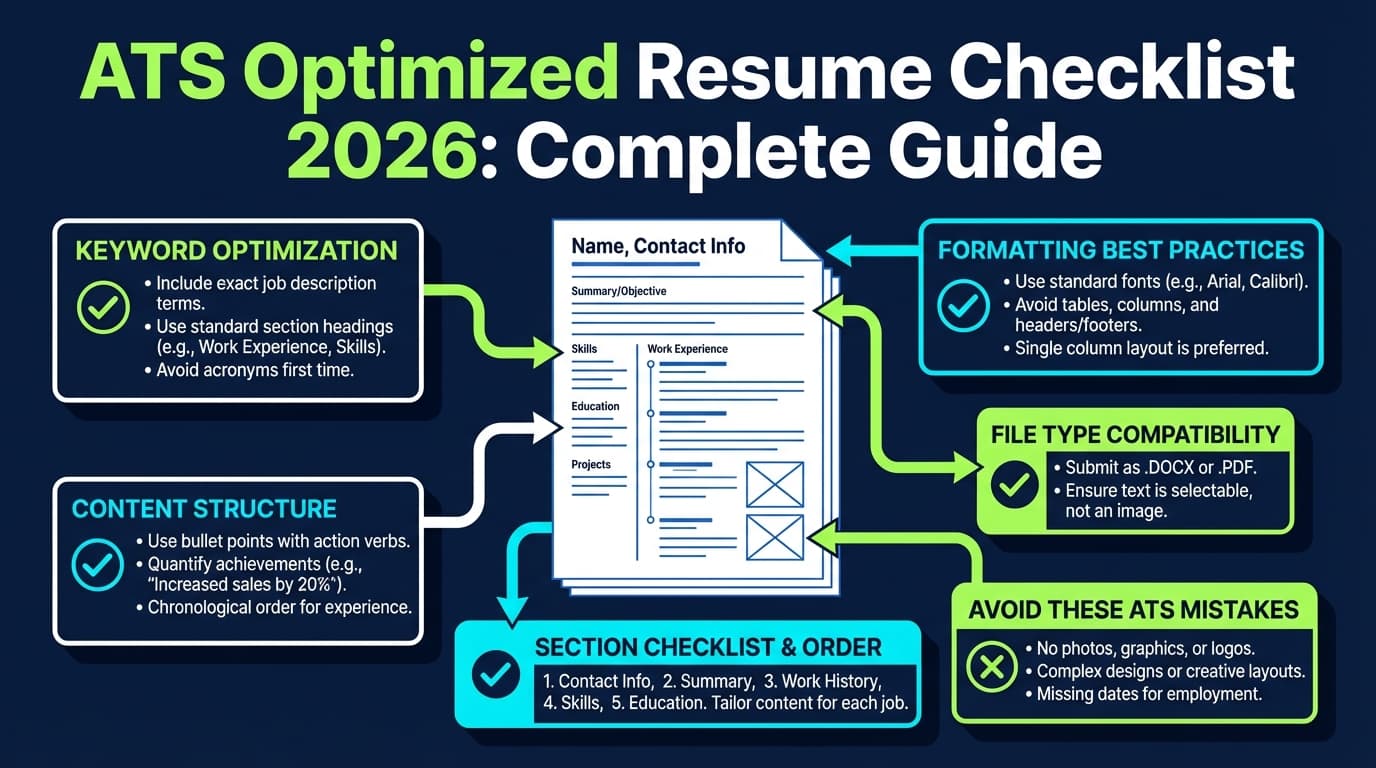
ATS-friendly formatting checklist (student edition)
Based on common ATS guidance (including UIC’s checklist), prioritize:
Layout
- Single column (UIC explicitly recommends this)
- No tables, no text boxes (UIC explicitly flags these)
- Minimal graphics/icons (often risky for parsing)
Headings
Use standard headings:
- Education
- Experience
- Projects
- Skills
- Leadership / Activities
Typography
- Use readable fonts (10–12pt body as a baseline)
- Keep spacing consistent
- Avoid heavy design elements that may confuse parsing
File type (PDF vs DOCX)
There’s disagreement across employers and ATS setups. Many career sites suggest:
- DOCX can be easier for ATS parsing
- PDF preserves formatting (and many ATS can read text-based PDFs)
If a job portal specifies a file type, follow it. If not:
- When in doubt for ATS-heavy portals: consider DOCX
- When emailing directly to a person: PDF is often fine (formatting stable)
For deeper reading, see discussions like Jobscan’s PDF vs Word guidance (and always defer to the application instructions). Source example (Jobscan): https://www.jobscan.co/blog/resume-pdf-vs-word/
Common mistakes students make with AI resume builders (and how to fix them)
Mistake 1: Letting AI invent metrics
Why it hurts: Recruiters will probe numbers in interviews. If you can’t explain them, trust drops fast.
Fix: Only use metrics you can defend. If you don’t have numbers, use scope:
- “Collaborated with a team of 4”
- “Analyzed 10,000 rows”
- “Supported 30+ weekly visitors”
Mistake 2: Using a fancy two-column template
Why it hurts: ATS may scramble columns or ignore sidebars.
Fix: Use a clean single-column layout (per UIC ATS guidance).
Mistake 3: Keyword stuffing
Why it hurts: It reads poorly to humans and can look manipulative.
Fix: Add keywords only where supported by your projects/experience. Use the job description’s language, but keep it natural.
Mistake 4: Generic, fluffy bullets
Why it hurts: “Responsible for…” doesn’t prove impact.
Fix: Convert responsibilities to outcomes:
- What did you do?
- How did you do it (tools)?
- What changed (result)?
Mistake 5: Treating one resume as “final”
Why it hurts: Different internships want different proof (projects vs leadership vs analytics).
Fix: Maintain:
- A “master resume”
- 2–4 targeted versions (e.g., SWE, Data, Marketing, PM)
Tools to help with a free AI student resume (honest recommendations)
Below are categories, not just brands—because “free” changes often.
1) Truly free/open-source resume builders
- OpenResume: Described as a free, open-source resume builder and parser.
Site: https://www.open-resume.com/
GitHub: https://github.com/xitanggg/open-resume
2) Free templates
- University career center templates (high quality, ATS-safe)
- Google Docs templates (simple, accessible)
3) AI rewriting/tailoring helpers
- Any general AI assistant can help rewrite bullets and tailor wording—as long as you provide real inputs and verify accuracy.
4) When you want deeper resume optimization + iterative tailoring (paid)
- JobShinobi: LaTeX resume builder with in-app PDF compilation, AI resume analysis (including ATS-style scoring/feedback), and job matching/tailoring workflows. It also supports a job application tracker (Excel export) and email-forwarding job tracking (Pro-gated).
Pricing: JobShinobi Pro is $20/month or $199.99/year. The pricing page mentions a 7-day free trial, but trial enforcement is not clearly verifiable in code—treat it as “mentioned,” not guaranteed.
If you’re a student applying to many roles and constantly iterating, tools that combine editing + analysis + version history can save time. Just be careful with any tool that claims a “free” download but paywalls exports.
A complete student resume example (copy structure)
Use this as a structure template (not a fill-in-the-blanks to copy verbatim).
NAME
City, ST | [email protected] | (555) 555-5555 | LinkedIn | GitHub/Portfolio
EDUCATION
University Name — B.S. in ___, Expected Month Year
Relevant Coursework: ___, ___, ___ (optional)
SKILLS
Technical: ___, ___, ___
Tools: ___, ___
Core: ___, ___
PROJECTS
Project Name — Tools (Month Year)
- Built ___ to solve ___ using ___
- Improved ___ by ___ (only if true)
Project Name — Tools (Month Year)
- Designed/created/analyzed ___
- Presented findings to ___; recommended ___
EXPERIENCE
Role — Organization (Month Year–Month Year)
- Led/managed/supported ___
- Coordinated ___; improved ___
LEADERSHIP & ACTIVITIES
Role — Club/Team (Month Year–Month Year)
- Organized ___; resulted in ___
- Mentored/trained ___
Key takeaways
- A “free AI resume builder” is usually a workflow (template + AI prompts + ATS checks), not one magic site.
- For students, Projects + Skills + clean formatting often matter more than a long job history.
- Keep your resume single-column and ATS-readable (UIC explicitly recommends avoiding tables/columns/text boxes).
- Use AI to rewrite and tailor, not to invent achievements.
- If you want advanced analysis and iterative tailoring, consider a dedicated tool—but verify pricing and export rules before investing.
FAQ (People Also Ask)
Is there a completely free AI resume builder?
Yes—some tools are genuinely free (including open-source options), and you can also create a free workflow using Google Docs plus an AI assistant for rewriting. Be cautious: many “free” resume builders charge to download.
Can ChatGPT write my resume?
It can help draft and rewrite sections, but you should provide real inputs and verify everything. A safer approach is: you write raw notes, then use AI to convert them into concise bullets and tailor them to a job description.
Do employers know if I used AI for my resume?
Usually they can’t “detect” it reliably, but recruiters can often sense overly generic language. The bigger risk is including claims you can’t explain. Use AI as an editor and keep bullets specific and defensible.
Should a college student resume be one page?
In most cases, yes. Boston College’s career center notes that for nearly all students, resumes submitted for jobs/internships should be one page. Source: https://www.bc.edu/bc-web/offices/studentaffairs/sites/careers/prepare/resume.html
What’s the most ATS-friendly resume format?
Generally: single column, clear headings, no tables/text boxes/graphics, and standard fonts. UIC’s ATS guidance explicitly recommends single-column formatting and avoiding tables/columns/text boxes. Source: https://careerservices.uic.edu/wp-content/uploads/sites/26/2017/08/Ensure-Your-Resume-Is-Read-ATS.pdf
Is PDF or Word better for ATS?
It depends on the employer’s system and instructions. If the portal specifies a format, follow it. If not, DOCX is often considered safer for parsing, while PDF preserves formatting for human readers. When in doubt: prioritize the application instructions and keep the file text-based (not an image PDF).