JobShinobi is an ATS resume tracker with a resume scanner designed for job seekers who want one connected workflow:
- Build and manage a structured resume (LaTeX-based)
- Scan it for ATS compatibility issues + keyword gaps
- Match it to a specific job description
- Track every application status in a realtime job tracker
- Optionally forward job emails to automatically log and update applications (Pro membership required)
If you’re tired of jumping between a resume checker, a spreadsheet, and your inbox—with no clear link between resume changes and job-search outcomes—JobShinobi brings it together.
Get started: Sign in with Google
Why Choose JobShinobi for an ATS Resume Tracker with Resume Scanner?
Most “resume scanner” tools focus on the scan and stop there. Most job trackers help you record applications and stop there. JobShinobi is built for the loop that actually improves results:
Scan → tailor → apply → track → learn → iterate.
Here’s what makes JobShinobi different for this use case.
1) A resume scanner built into your resume workflow (LaTeX-first)
JobShinobi’s resumes are stored as LaTeX source. That matters because your “scanner” isn’t guessing at formatting from a PDF upload—it can analyze the actual structured content you’re editing.
You can:
- Start from a template
- Edit in a LaTeX editor
- Generate a PDF preview (cloud compilation)
- Download your resume as PDF and also download the .tex source
This is especially useful if you prefer a precise, consistent resume layout you can version and refine.
2) AI resume analysis that goes beyond a single score
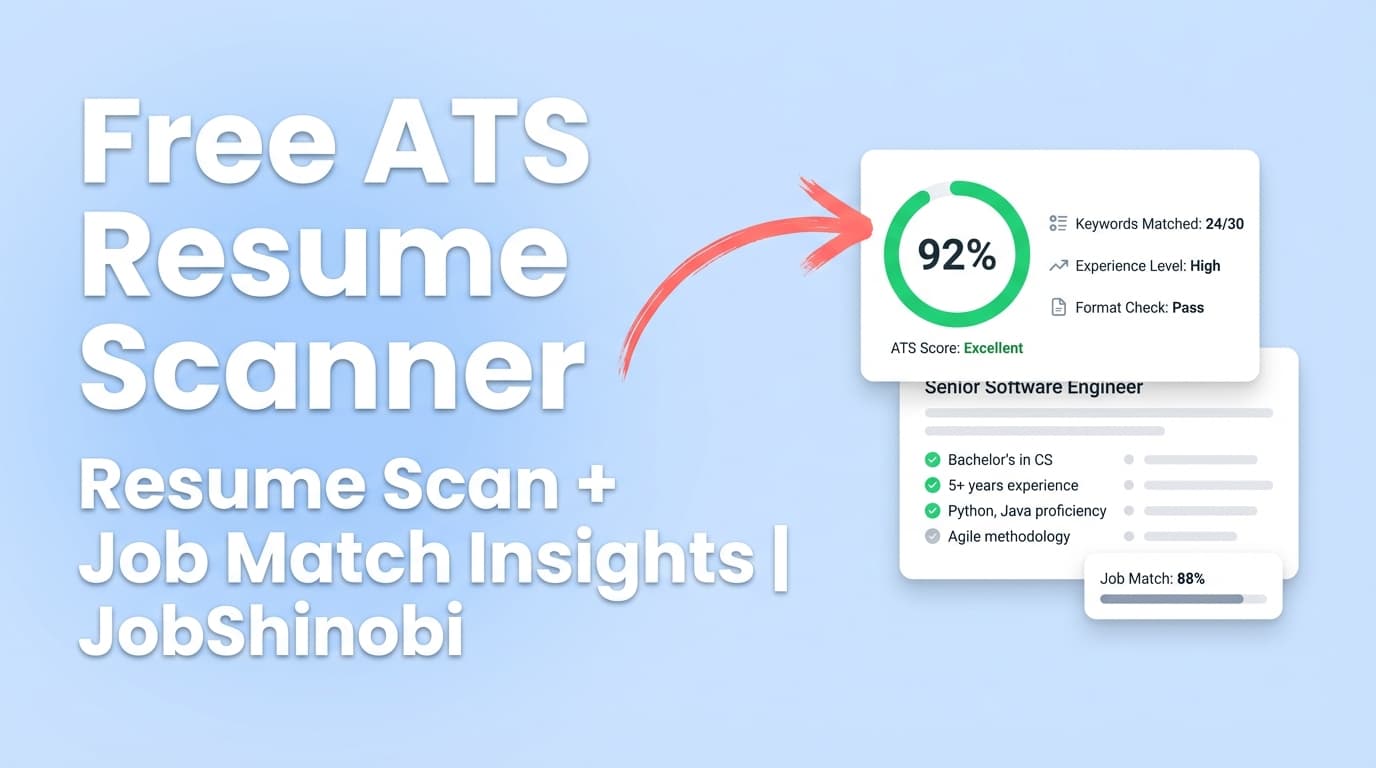
JobShinobi’s resume analysis can produce:
- Overall score
- Category scores like content, keyword, formatting, completeness, ATS
- Strengths / weaknesses / missing sections
- ATS issues (potential compatibility problems)
- Keyword analysis (present, missing, overused keywords + density/context fields when provided)
- Deeper breakdowns such as section scores, bullet analysis, ATS analysis, length analysis, benchmarking, and role alignment (depending on the analysis response)
It’s designed to give you a real improvement plan—not just a number.
3) Job-specific matching (so you’re not optimizing “in general”)
Generic ATS scanning often leads to vague advice (“add more keywords”). JobShinobi supports job-specific matching so you can:
- Provide a job description (or job details extracted from a URL/text)
- Generate a match analysis that identifies missing vs present keywords
- Get tailoring recommendations you can apply in the editor
In other words: your scanner becomes a targeting tool.
4) A job application tracker with realtime updates and Excel export
JobShinobi’s job tracker helps you stay organized with:
- Application records (company, job title, status)
- Status management (e.g., Applied, Interview, Offer, Rejected, etc.)
- Realtime updates so your tracker stays current
- Export to Excel (.xlsx)
This is your job-search command center, not another spreadsheet to babysit.
5) Email-forwarding automation (Pro membership required)
If you want a tracker that doesn’t rely on constant manual entry, JobShinobi supports a workflow where you forward job-related emails to your unique forwarding address.
JobShinobi can:
- Parse job emails with AI
- Extract structured fields like company, job title, status
- Use fuzzy matching (company/title similarity) to update the correct application instead of creating duplicates
- Log processing and (when enabled) send success/failure notifications
This is especially helpful when you’re applying at volume and most status changes live inside your inbox.
What “ATS Resume Tracker with Resume Scanner” Means (and What It Should Do)
If you searched this keyword, you’re likely looking for a tool that can do both:
- Resume scanner: Identify ATS issues, missing keywords, weak bullets, and gaps versus job postings
- Resume/application tracker: Keep a pipeline view of where you applied, where you’re interviewing, and where you’re getting rejected—so you can adjust your approach
JobShinobi is built around that combined workflow—without claiming to “replicate every ATS exactly.” ATS behavior varies by employer, but you can improve your odds by tightening formatting, strengthening content, and aligning keywords responsibly.
How JobShinobi’s ATS Resume Tracker + Resume Scanner Works
Step 1: Sign in and access your dashboard
Start here: Sign in with Google
From the dashboard, you can access:
- Your resume builder and analysis workflow
- Your job tracker
- Your analytics page (derived from your tracked applications)
Step 2: Create your resume from templates (LaTeX-based resume builder)
Go to: /dashboard/resume
You can:
- Start from a template
- Save multiple resumes (useful for multiple target roles)
- Duplicate a resume to create role-specific versions
Why this matters for scanning: Your scanner is analyzing the same resume source you’re actually using to apply.
Step 3: Edit in the LaTeX editor and preview a compiled PDF
In the resume editor, you can:
- Edit LaTeX manually
- Compile and preview the resume as a PDF
- Download PDF and download
.tex
This helps you maintain clean, consistent formatting while you iterate.
Step 4: Run the resume scanner (ATS + keyword feedback)
Run analysis to generate:
- Scores (overall + category breakdown)
- ATS issues and improvement suggestions
- Keyword analysis and skill detection fields (where included)
Time saver: If your resume hasn’t changed, the analysis can return cached results instead of repeating the same scan.
Step 5: Match your resume to a specific job description
For job-specific tailoring, provide job information and run match analysis. You’ll see:
- Match score
- Missing vs present keywords
- Recommendations and suggested changes
Then use the editor (manual or AI-assisted) to update the resume.
Step 6: Track applications in the job tracker (and export anytime)
Go to: /dashboard/job-tracker
Use it to:
- Add applications
- Update status as you progress
- Export to Excel (.xlsx)
Step 7 (Optional): Forward job emails to auto-update your tracker (Pro required)
If you have Pro membership, you’ll have a unique forwarding address in settings. Forward job emails (confirmations, interview invites, rejections) and JobShinobi will attempt to parse and update your tracker automatically.
Key Features for an ATS Resume Tracker with Resume Scanner
| Feature | What It Does | Why It Matters |
|---|---|---|
| LaTeX Resume Builder + templates | Create, save, and manage resumes as LaTeX source | A structured source makes consistent editing and scanning easier |
| PDF compilation + preview | Compile LaTeX and preview a PDF | Ensures your final resume output looks correct |
Download PDF + download .tex |
Export your resume outputs | You control your files and formats |
| AI Resume Analysis (ATS + keywords) | Generates ATS issues, strengths/weaknesses, missing sections, keyword analysis, and score breakdowns | Converts “scan anxiety” into actionable fixes |
| Cached analysis when unchanged | Returns prior results if the resume hasn’t been updated | Faster iteration without redundant scans |
| Job-specific resume matching | Compare resume to a job posting and get missing/present keywords | Helps you tailor per application instead of guessing |
| AI Resume Editor (streaming) | Chat-assisted editing that can update LaTeX and verify compilation | Improves speed of iteration and reduces formatting breakage |
| Resume version history | Stores versions from saves and AI chat | Lets you revert, compare, and safely experiment |
| Job Application Tracker | Track applications in a dashboard UI | Replaces spreadsheets and sticky notes |
| Realtime tracker updates | Tracker updates when records change | Keeps your pipeline accurate across sessions |
| Excel export (.xlsx) | Export your tracked applications | Easy reporting and portability |
| Email forwarding + parsing (Pro) | Parse forwarded emails into application updates | Reduces manual entry and keeps statuses current |
| Job search analytics | Response rate, offer rate, interview conversion, and trends | Helps you make decisions based on outcomes |
What JobShinobi’s Resume Scanner Actually Checks (Practical Breakdown)
“Resume scanner” can mean a lot of things. Here’s what JobShinobi’s analysis is designed to return so you know what you’re getting.
Resume scores (overall + category scores)
You can receive an overall score and category scores such as:
- Content score
- Keyword score
- Formatting score
- Completeness score
- ATS score
These are useful for seeing where you’re weak and for tracking improvements as you iterate.
ATS issues (compatibility flags)
Your analysis can include an ATS issues list—problems that may reduce compatibility or clarity.
This can be especially helpful if you’ve ever wondered:
- “Why does my resume look great to me but fail in scanners?”
- “Is the structure confusing or missing core sections?”
- “Am I creating parsing risk with formatting choices?”
Strengths, weaknesses, and missing sections
A helpful scanner doesn’t just criticize—it prioritizes.
JobShinobi can return:
- Strengths (what to keep)
- Weaknesses (what to fix)
- Missing sections (what might be expected for your target role)
Keyword analysis (present, missing, overused)
JobShinobi’s scanner can include keyword insights like:
- Present keywords
- Missing keywords
- Overused keywords
- Keyword density / contextual usage fields (where included)
- Industry coverage and top skills detected (where included)
This helps you align with job requirements while avoiding keyword stuffing.
Bullet analysis (quality and impact)
When bullet analysis is included, it can help identify:
- Weak bullet patterns
- Missing quantification
- Under-specific outcomes
- Opportunities to tighten language
Enhanced analysis mode (when enabled)
JobShinobi supports an enhanced analysis mode (via an enhancedMode flag) that can store richer objects such as:
- Semantic keywords
- Impact analysis
- Career progression analysis
- Action queue / priority actions
If you like structured next steps rather than scattered suggestions, this is especially valuable.
The Tracker Side: How JobShinobi Helps You Run the Job Search
A resume scanner helps you improve inputs. A job tracker helps you measure outputs. You need both.
Track applications with clear statuses
JobShinobi’s job tracker is designed for the pipeline realities of job searching, where the important thing is keeping every application moving—or learning why it’s not.
You can maintain records with:
- Company
- Job title
- Status (e.g., Applied, Interview, Offer, Rejected, Other)
Realtime updates (so your tracker stays accurate)
The tracker updates in realtime so changes show up as they happen, which is useful when you’re actively managing many applications.
Export to Excel (.xlsx)
Export your job applications to a spreadsheet file whenever you want—useful for:
- Sharing with a coach
- Personal reporting
- A backup you control
- Adding your own custom columns offline
Job search analytics (response rate, offer rate, interview conversion)
Once you track statuses, you can compute performance metrics like:
- Response rate
- Offer rate
- Interview conversion
- Monthly trends
This is how you stop guessing and start adjusting based on real outcomes.
Email Forwarding Automation (Pro): Turn Your Inbox into Tracking Updates
Many job seekers lose the thread because critical status updates live in email:
- “Thanks for applying…”
- “Can you interview next week?”
- “We’re moving forward with other candidates…”
JobShinobi supports an email-forwarding workflow that can convert those inbox messages into tracker updates.
How it works (in plain language)
- You get a unique forwarding email address in settings
- You forward job-related emails there
- JobShinobi uses AI to parse the message and extract job details
- It attempts to create or update the matching application in your tracker
Fuzzy matching to prevent duplicates
JobShinobi attempts fuzzy matching based on company/title similarity so it can update an existing application record instead of duplicating it when:
- Subject lines vary
- Recruiters use different email templates
- The role name changes slightly across emails
What gets extracted
The email parsing workflow is designed to extract fields like:
- Company
- Job title
- Status (Applied / Interview / Offer / Rejected / Other)
- Optional fields such as location, salary, job URL, and additional info (when present in the email)
Important note: Pro membership required
Email processing for forwarded messages requires Pro membership.
ATS Resume Tracker with Resume Scanner vs. Alternatives
JobShinobi vs. “resume scanner only” tools
A scanner-only tool can help you fix a resume, but it won’t help you run the job search process:
- Which resume version did you send to which job?
- Are interviews increasing after you changed your resume?
- Are you improving conversion rates—or just improving a score?
JobShinobi adds the tracker + analytics layer so you can connect improvements to outcomes.
JobShinobi vs. “job tracker only” tools
A tracker-only tool can help you remember where you applied, but it doesn’t improve the main lever that gets you interviews: the resume’s relevance and clarity.
JobShinobi adds scanning + job matching so you can tailor before you apply.
JobShinobi vs. spreadsheets
Spreadsheets are flexible, but they’re manual and easy to abandon. The biggest costs show up when you apply at volume:
- Manual entry takes time
- Status updates get missed
- You can’t easily connect inbox updates to tracker rows
JobShinobi supports realtime tracking, optional email-forwarding automation (Pro), and Excel export so you can keep your workflow modern without losing ownership.
JobShinobi vs. uploading PDFs into scanners
Many scanners center on uploading a PDF. JobShinobi’s workflow is different:
- You build/manage resumes in-app as LaTeX source
- The scanner analyzes that LaTeX content
- You compile and download a PDF output when needed
If you prefer a “upload any PDF and scan it” workflow, JobShinobi is not positioned as an OCR/PDF parsing tool. It’s a build + scan + iterate system.
When This Landing Page Is the Right Fit (Use Cases)
If you’re applying to many roles and losing track
You’re a match if:
- You’ve applied to 30–200+ roles
- Your status updates are scattered across email threads
- You’re not sure what’s working
JobShinobi helps you track the pipeline and reduce manual updates through email forwarding (Pro).
If you want job-specific resume improvement (not generic advice)
You’re a match if:
- You want missing/present keywords versus a job description
- You want to tailor without rewriting from scratch each time
- You want repeatable iteration with version history
JobShinobi supports job-specific match analysis and structured resume editing.
If you care about format control and consistency
You’re a match if:
- You want a consistent resume structure that doesn’t “break”
- You like precise formatting and repeatable templates
- You want PDF output while editing a stable source
That’s the core strength of a LaTeX-first resume workflow.
How to Get the Most Value from JobShinobi (Recommended Workflow)
1) Create one strong baseline resume for your target role
Start with one resume built for your primary role (e.g., “Data Analyst” or “Frontend Engineer”). Build it cleanly and scan it until:
- ATS issues are reduced
- Missing sections are addressed
- Bullets are clear and specific
2) Duplicate for role variants
When you’re applying across related roles, create variants:
- “Backend Engineer” vs “Platform Engineer”
- “Marketing Manager” vs “Growth Marketer”
- “Data Analyst” vs “BI Analyst”
Use duplicates to avoid losing your baseline.
3) Match each variant to job descriptions (responsibly)
Use job-specific matching to identify missing terms and align language, but avoid keyword stuffing. The goal is:
- Use the employer’s terminology where it truthfully matches your experience
- Prioritize core skills and requirements
- Keep the resume readable for humans too
4) Track and measure outcomes
Use the job tracker and analytics to answer:
- Are you getting more interviews?
- Which resume variant performs best?
- Are you applying consistently each week/month?
This is how you turn job searching from a grind into an optimization process.
Pricing
JobShinobi offers paid subscriptions via Stripe:
- Monthly: $20.00
- Yearly: $199.99
Pro membership is required for email forwarding + processing automation.
Subscribe via Stripe payment links:
- Monthly: https://buy.stripe.com/7sYeV61P10GS310eTy0VO02
- Yearly: https://buy.stripe.com/6oU9AM0KXexIdFE5iY0VO03
Start here: Sign in
Frequently Asked Questions
What is an “ATS resume tracker with resume scanner”?
It’s a combined system that helps you:
- Scan your resume for ATS issues and keyword gaps (especially versus a job posting)
- Track your job applications and statuses (Applied/Interview/Offer/Rejected, etc.)
JobShinobi supports both: resume analysis + job matching, plus a job tracker with realtime updates and analytics.
Does JobShinobi let me scan my resume against a job description?
Yes. You can provide job data (including a job description) and generate a match analysis that identifies missing vs present keywords and stores a job analysis record.
Does JobShinobi support PDF upload scanning or OCR?
No. JobShinobi is not an OCR/image-based scanner. The resume workflow is LaTeX-based and the analysis reads the resume content from that LaTeX source.
Can JobShinobi automatically track applications from my email?
Yes—via email forwarding to your unique forwarding address, with Pro membership. JobShinobi parses forwarded job emails and attempts to create or update the correct application record using fuzzy matching.
Can I export my job tracker?
Yes. JobShinobi exports job applications to Excel (.xlsx).
Is JobShinobi a job board or auto-apply tool?
No. JobShinobi is focused on resume building/scanning, job matching analysis, and job application tracking (including email-forwarding automation), not auto-applying to job boards.
Will JobShinobi guarantee I “beat every ATS”?
No tool can guarantee outcomes across every employer’s ATS configuration. JobShinobi provides structured ATS/keyword feedback and job-specific matching to improve clarity and relevance, but hiring systems vary.
How do I get started fast?
- Sign in
- Create a resume from a template: /dashboard/resume
- Run a scan + match to a job post
- Track your applications: /dashboard/job-tracker
Get Started with JobShinobi Today
If you want an ATS resume tracker with a resume scanner that supports the full workflow—scan, tailor, apply, track, and iterate—JobShinobi is built for you.
- Build structured resumes with LaTeX templates
- Scan for ATS issues and keyword gaps
- Match your resume to specific job postings
- Track applications in realtime and export to Excel
- Reduce manual tracking by forwarding job emails (Pro required)
- Measure outcomes with job-search analytics
Next step: Sign in with Google