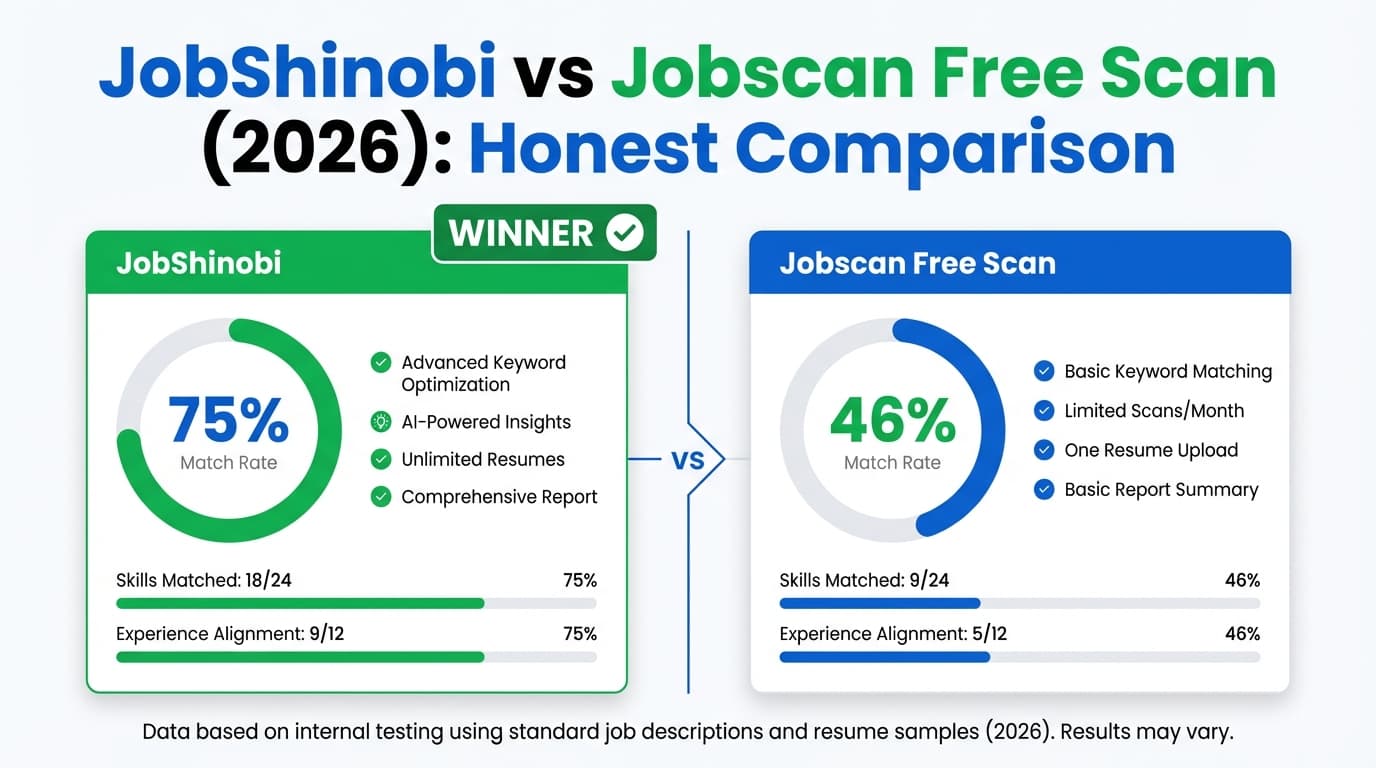
If you’re searching JobShinobi vs Jobscan Free Scan, you’re likely deciding between two different approaches:
- Jobscan Free Scan: a popular, straightforward way to scan your resume against a job description a limited number of times for free.
- JobShinobi: a broader system that combines resume building + ATS feedback + job matching + application tracking, including a unique email-forwarding workflow for tracking.
Quick Verdict:
- Pick Jobscan Free Scan if you want a well-known ATS-style scan and you only need a handful of scans monthly.
- Pick JobShinobi if you want an end-to-end workflow (tailor, version, track, analyze) and/or you apply at higher volume.
Important verification note (transparency): During research, multiple Jobscan marketing/support pages returned HTTP 403 to our page-analysis tool, limiting direct on-page extraction. Competitor pricing and key free-tier limits were verified primarily via Jobscan’s in-app plan page (
https://app.jobscan.co/plan) and Jobscan support article snippets indexed by Google. When in doubt, confirm inside your Jobscan account.
TL;DR Comparison
| Feature | JobShinobi | Jobscan Free Scan |
|---|---|---|
| Resume scan vs job description | ✅ Yes (resume scoring + job matching) | ✅ Yes (free scans are limited) |
| Free scan allowance | Limited free access (core automation is Pro-gated) | ✅ 5 free resume scans/month + 5 on signup (per Jobscan plan page snippets) |
| Do rescans count? | Not framed as scan-quota-based | ✅ Yes—Jobscan support indicates scans include rescans (support topic “How are scans deducted…”) |
| Resume builder | ✅ LaTeX templates + editor + PDF preview | ✅ Jobscan markets a free resume builder |
| Version history / revert workflow | ✅ Yes (resume versions + “unlimited undo” behavior) | Not a primary differentiator publicly |
| Job tracker | ✅ Built-in tracker + analytics + Excel export | ✅ Jobscan offers a Job Tracker (also has a Chrome extension listing) |
| Automated tracking from forwarded emails | ✅ Yes (Pro; forward emails → auto-log/update jobs) | ❌ Not known as a native workflow |
| Starting paid price | $20/mo | $49.95/mo (Premium monthly) |
| Best for | High-volume applicants + workflow + tracking automation | Occasional applicants who want quick scans + established brand |
JobShinobi Overview
JobShinobi is an AI resume builder + ATS resume analyzer + job search tracker built for job seekers who are tired of ATS rejections and tracking everything manually.
According to the product documentation provided (product.md), JobShinobi’s differentiators include:
- LaTeX-first resume creation (templates, editing, cloud compilation, PDF preview)
- AI resume scoring (keywords/ATS/formatting/completeness breakdowns, cached analysis)
- Job description extraction + resume-to-job matching
- Resume version history (save versions, revert, chat-driven changes)
- Job application tracking with analytics and Excel export
- A standout workflow: forward job emails to a unique address and JobShinobi uses AI to parse and log/update your applications automatically (Pro feature)
Key Strengths
- Email-forwarding → automatic tracking (Pro): Forward application emails and JobShinobi can extract company/title/status and update your tracker.
- LaTeX + PDF preview: Strong if you want more control over structure and a consistent, clean output.
Limitations (honest)
- Email automation requires Pro: The email parsing/processing workflow is gated to paid membership.
- LaTeX learning curve: If you prefer a classic drag-and-drop builder, LaTeX may feel unfamiliar at first.
Jobscan Free Scan Overview (Verified)
Jobscan is a widely known resume scanning tool that compares your resume to a job description and provides match feedback (keywords, ATS-style checks, and guidance).
What “Jobscan Free Scan” includes (verified via Jobscan plan/support snippets)
From Jobscan’s plan page snippet (indexed from https://app.jobscan.co/plan):
- 5 Free Resume Scans on signup
- 5 Free Resume Scans monthly
- 5 ATS & Recruiter Findings
- Job Tracker
- Post Interview Thank You Notes
- Job Board
- Resume Builder
From Jobscan support snippet (“When do I get my free monthly scans?”):
- Free scans are added monthly on the date you joined.
- Unused scans roll over up to a maximum of 5 unused scans.
From Jobscan support topics indexed in search:
- Jobscan clarifies “What is a scan?” as a resume vs job description comparison.
- There is also a help topic indicating scans can be deducted when you rescan after edits (scan accounting can matter a lot on the free plan).
Key Strengths
- Simple, familiar scan workflow: If you mainly want a match score + keyword guidance, Jobscan is one of the most recognized options.
- Job tracking ecosystem: Jobscan offers a Job Tracker, and Jobscan also has a Chrome Web Store listing for a job search tracker extension (useful if you save jobs from sites like LinkedIn/Indeed).
Limitations (from common review themes & help content)
Across user discussions and review sources surfaced in search (e.g., Trustpilot listing pages, Reddit threads, review roundups):
- Free scan limit is easy to hit if you iterate frequently.
- Some users report frustration with chasing a score that may not perfectly represent real ATS behavior.
- Cancellation/trial questions come up often enough that Jobscan maintains multiple support articles about cancelling, trial billing, and refunds (worth reading before upgrading).
Feature-by-Feature Comparison
1) Resume Scan Quality & Keyword Guidance
JobShinobi:
- Provides structured resume scoring across multiple categories (overall plus breakdowns like keywords/ATS/formatting/completeness).
- Provides job matching (paste job text or URL → extract job details → compare and surface gaps).
Jobscan Free Scan:
- The core product is the scan: resume vs job description and match feedback.
- Free tier is limited to 5 scans/month (plus signup scans) which is fine for occasional use.
Winner: Tie (depends on what you consider “better”).
- Jobscan wins for a quick, widely recognized scan experience.
- JobShinobi wins if you want the scan as part of a broader tailoring + tracking workflow.
2) Iteration Speed (How quickly you can tailor many applications)
JobShinobi:
- Built for iteration: analysis + matching + editing + version history.
- You can keep multiple resume versions and revert changes as you tailor.
Jobscan Free Scan:
- Scan quotas can slow you down if you tailor frequently.
- Jobscan’s own help content indicates a “scan” includes the comparison itself and can include rescans (which matters when you tweak a line and re-check).
Winner: JobShinobi (especially for high-volume applicants).
3) Resume Building Experience
JobShinobi:
- LaTeX resume templates + editor + cloud compilation.
- Export PDF and
.tex.
Jobscan Free Scan:
- Jobscan markets a free resume builder and also provides free resume templates (Word-compatible downloads are mentioned in indexed pages/snippets).
Winner: Depends on preference.
- Choose Jobscan if you want a more conventional builder/templates.
- Choose JobShinobi if you want a LaTeX-based workflow with tight control and integrated versioning.
4) Job Tracking & Job Search Organization
JobShinobi:
- Full job application tracker (CRUD), realtime updates, and Excel export.
- Analytics dashboard (e.g., response rates, trends).
Jobscan Free Scan:
- Jobscan includes a Job Tracker on its plan page.
- Jobscan also has a Chrome extension (Chrome Web Store listing) to help collect/track job applications.
Winner: Slight edge to JobShinobi for users who want analytics + export + automation as a core workflow, but Jobscan is credible here—especially if you like tracking from job boards via extension.
5) Automation (Reducing manual work)
JobShinobi:
- Differentiator: forward emails → AI extracts job details and logs/updates your tracker automatically (Pro required).
Jobscan Free Scan:
- No widely documented email-forwarding automation workflow.
Winner: JobShinobi.
Pricing Comparison (Current)
JobShinobi Pricing (from product.md)
- Pro (Monthly): $20.00/month
- Pro (Yearly): $199.99/year
- Free tier exists but core automation (email processing) is gated to Pro.
Jobscan Pricing (verified via indexed plan page snippets and multiple corroborating sources)
From https://app.jobscan.co/plan (indexed snippet):
- Free: $0 (includes scan quota as described)
- Monthly Premium: $49.95/month
- Quarterly: $89.95 billed every 3 months (~$29.98/mo)
Free trial notes (verified via indexed snippets):
- Jobscan promotes a two-week free trial tied to the quarterly plan in some contexts (also appears on Jobscan promos/cancellation policy snippets). Trial terms can vary—confirm on Jobscan’s plan/promo/cancellation pages at the time you subscribe.
| Plan | JobShinobi | Jobscan Free Scan |
|---|---|---|
| Free | Limited (automation is Pro-gated) | $0 (5 scans/month + signup scans) |
| Monthly | $20.00/mo | $49.95/mo |
| Quarterly | N/A | $89.95 / 3 months (~$29.98/mo) |
| Yearly | $199.99/yr | Not consistently verifiable via accessible sources |
Value Analysis:
- If you truly only need a few scans/month, Jobscan’s free plan can be the best value (it’s free).
- If you need unlimited iteration + a workflow, Jobscan’s Premium cost adds up quickly; JobShinobi is priced lower and is designed around tracking + iteration.
Who Should Choose JobShinobi?
You’ll prefer JobShinobi if you:
- Apply to many jobs and need a repeatable system.
- Want resume analysis + job matching + editing in one place.
- Want version history so tailoring doesn’t become messy.
- Want a job tracker with analytics and Excel export.
- Want email-forwarding automation to reduce manual job tracking (Pro).
Who Should Choose Jobscan Free Scan?
You’ll prefer Jobscan Free Scan if you:
- Want a quick ATS-style score and only need it a few times per month.
- Like Jobscan’s ecosystem (resume builder/templates, job tracker, Chrome extension).
- Don’t want a LaTeX-based workflow.
- Want to try before paying—and you’re comfortable with scan quotas.
Switching from Jobscan Free Scan to JobShinobi
If you’ve been using Jobscan’s free scans and want a more scalable workflow, here’s what switching typically looks like:
- Data migration: Jobscan scan history isn’t commonly offered as a structured export (not verified as a feature). Practically, most users start fresh in JobShinobi and re-run analysis on active target roles.
- Resume migration: Bring your current resume content into a JobShinobi template and iterate from there.
- Learning curve: Moderate (especially if you’ve never used LaTeX). If you value consistent formatting and versioning, it usually pays off.
- Support/workflow: JobShinobi is designed around a pipeline: build → analyze → match → tailor → track → learn from analytics.
FAQ
Is JobShinobi really better than Jobscan Free Scan?
Not for everyone. If you only need a few scans monthly, Jobscan Free Scan is a practical choice. JobShinobi is the stronger fit when you want a complete workflow—resume building, deeper analysis, and tracking/automation—especially at higher application volume.
Can I migrate from Jobscan to JobShinobi?
You can migrate your resume content easily (copy/paste/rebuild), but scan history and internal Jobscan metrics typically aren’t designed as portable exports. Most people switch by bringing their current resume into JobShinobi and continuing from there.
Which is cheaper?
- Cheapest option: Jobscan Free Scan ($0).
- Cheapest paid plan in this comparison: JobShinobi Pro at $20/month, compared to Jobscan Premium at $49.95/month (quarterly billing lowers the effective monthly cost but requires upfront payment).
How many free scans does Jobscan give?
Based on Jobscan’s indexed plan page snippets, Jobscan provides 5 free resume scans on signup and 5 free resume scans per month, with unused scans rolling over up to a maximum of 5 unused scans (per indexed support snippet). Always confirm the current limits on Jobscan’s plan page because these policies can change.
Do ATS match scores guarantee interviews?
No. ATS scoring tools are best used as guidance for keyword alignment, clarity, and formatting—not as a guarantee. Real hiring outcomes vary by company, recruiter behavior, and the specific ATS configuration.