Most job seekers don’t lose interviews because they’re unqualified—they lose them because their resume doesn’t get read the way they think it does.
Recruiters skim fast. The Ladders’ eye-tracking research is widely cited for showing recruiters spend about 7.4 seconds on an initial resume scan, and simple layouts were easier to review (reported by HR Dive, with the original Ladders PDF available).
Sources:
- HR Dive summary (HIGH confidence): https://www.hrdive.com/news/eye-tracking-study-shows-recruiters-look-at-resumes-for-7-seconds/541582/
- The Ladders eye-tracking study PDF (HIGH confidence): https://www.theladders.com/static/images/basicSite/pdfs/TheLadders-EyeTracking-StudyC2.pdf
So if you’re searching for the best free resume format for ATS 2026, the goal isn’t to “game” software—it’s to create a resume that:
- parses cleanly (so your experience and skills don’t scramble in an ATS), and
- scans cleanly (so a recruiter can understand your value in seconds).
In this guide, you’ll learn:
- The #1 ATS-safe resume format for 2026 (and when to choose the runner-up)
- Free copy/paste templates (chronological + hybrid + student/entry-level)
- ATS formatting rules that prevent parsing failures (columns, tables, headers/footers, icons)
- PDF vs DOCX: what to submit and how to reduce risk
- A free “plain-text test” that catches formatting problems before you apply
- FAQs pulled directly from real SERP questions
What is an ATS (and what “ATS-friendly format” actually means)?
An Applicant Tracking System (ATS) is software employers use to collect and manage applications—and often to parse resumes into structured fields (e.g., job titles, dates, skills). Workable’s explainer describes resume parsing as extracting key data like names, job titles, and education into structured information.
Source (HIGH confidence): https://resources.workable.com/stories-and-insights/how-ATS-reads-resumes
An ATS-friendly resume format is a resume layout that’s likely to:
- be read accurately by resume parsing systems, and
- be readable to humans quickly (since humans still decide who gets interviews).
Do ATS systems really matter in 2026?
Yes—especially at larger employers and high-volume roles.
Here are credible, traceable data points you can rely on:
-
“About 99% of Fortune 500 companies use some form of ATS.” (MIT Career Advising & Professional Development)
Source (MEDIUM confidence; excellent authority, but it’s a rounded “about” estimate): https://capd.mit.edu/resources/make-your-resume-ats-friendly/ -
78% of HR professionals report using an ATS (HR.com “Future of Recruitment Technologies 2025–26”)
Source (MEDIUM confidence; survey-based, depends on sample): https://www.hr.com/en/magazines/all_articles/hrcom%E2%80%99s-future-of-recruitment-technologies-2025-26_mh34lgc0.html -
The ATS market continues to grow: $2.5B global ATS software market in 2024 (+12.3% YoY) (iCIMS citing Apps Run the World data)
Source (MEDIUM confidence; iCIMS is referencing a third-party report): https://www.icims.com/company/newsroom/appsruntheworld2025/ -
Recruiters skim quickly: ~7.4 seconds initial scan (The Ladders / HR Dive)
Sources (HIGH confidence): https://www.hrdive.com/news/eye-tracking-study-shows-recruiters-look-at-resumes-for-7-seconds/541582/ and https://www.theladders.com/static/images/basicSite/pdfs/TheLadders-EyeTracking-StudyC2.pdf
Bottom line: ATS-friendly formatting is still the default best practice in 2026—because it reduces parsing risk and improves human scan-ability.
The Best Free Resume Format for ATS 2026 (the one you should use most of the time)
The best overall ATS format: Single-column reverse-chronological
If you want the safest answer to “best free resume format for ATS 2026,” it’s:
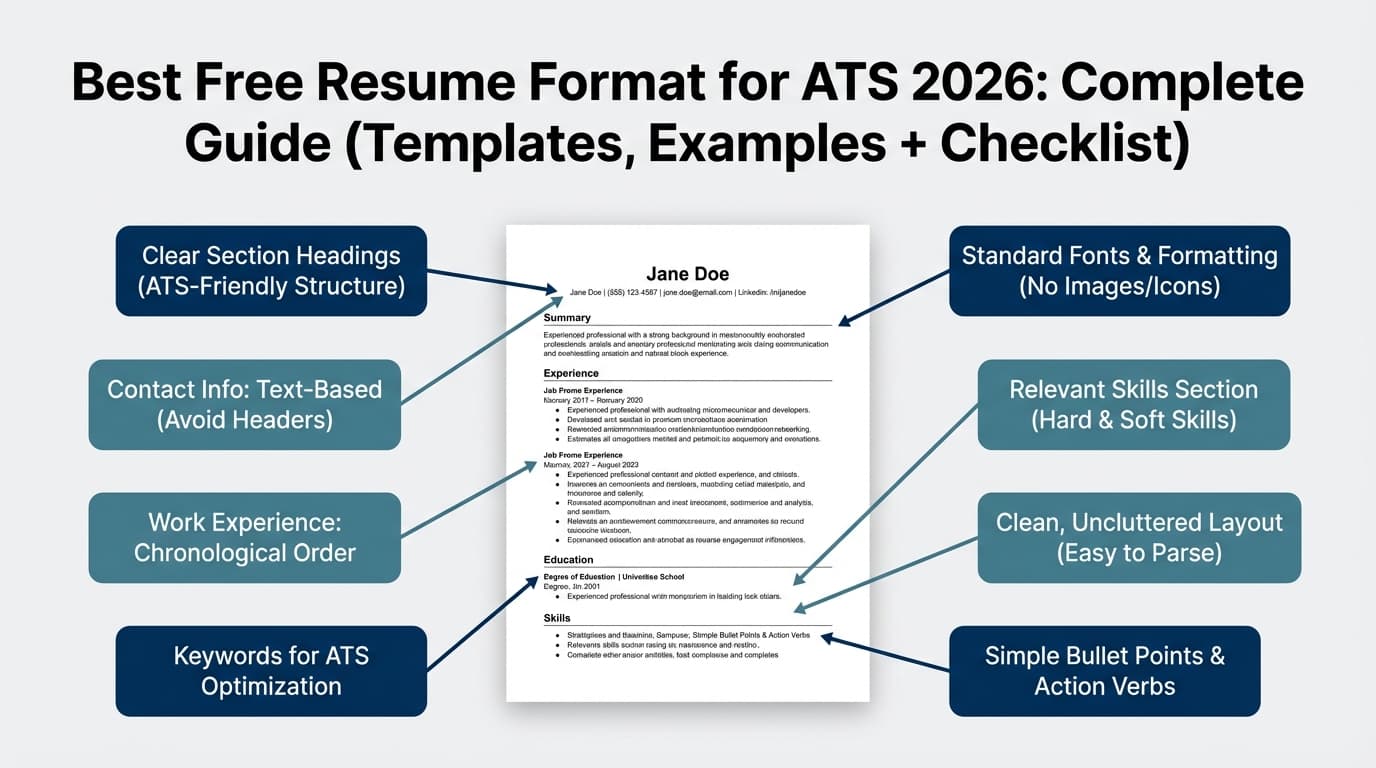
A single-column, reverse-chronological resume with standard headings and simple typography.
Why it works (practically):
- Most parsing systems and importer tools handle linear text best.
- Recruiters expect this structure and can skim it quickly.
- It’s easy to create for free in Google Docs or Word without fancy design elements.
Both major competitor guides emphasize the same core principles:
- Use a simple, ATS-safe structure (Novoresume ATS template guide)
Source: https://novoresume.com/career-blog/ats-friendly-resume-templates - Use single-column layout, standard headings, and simple fonts (Scale.jobs ATS format guide)
Source: https://scale.jobs/blog/ats-resume-format-2026-design-guide
Who should use this format:
- Most applicants (entry → senior)
- Anyone applying through portals (Workday, Greenhouse, etc.)
- Anyone who’s submitting many applications and needs maximum compatibility
The runner-up: Hybrid/Combination format (still single-column)
A hybrid resume can still be ATS-friendly if it stays single-column and avoids tables/text boxes.
Use hybrid if:
- You’re changing careers and need a “Relevant Skills” or “Selected Projects” bridge
- Your best proof is project-based (engineering, data, product, marketing portfolios)
- You have a non-linear path and want to highlight transferable strengths
IntelligentCV’s guide covers both ATS basics and step-by-step structure, including sections you can adapt for a hybrid resume.
Source: https://www.intelligentcv.app/career/ats-resume-format-guide/
Avoid “functional-only” resumes for most ATS-heavy applications unless you have a specific reason and a recruiter-friendly version ready. Multiple guides recommend chronological or hybrid over purely functional for clarity (e.g., Scale.jobs; Novoresume).
Sources:
- https://scale.jobs/blog/ats-resume-format-2026-design-guide
- https://novoresume.com/career-blog/ats-friendly-resume-templates
What makes a resume ATS-friendly in 2026 (format rules that prevent parsing errors)
Here’s the truth: an ATS doesn’t “reject” you because your margins are 0.6". But certain design choices can cause the system to misread or scramble key information, which can lower your match ranking—or create confusion when a recruiter views your parsed profile.
MIT’s career office explicitly recommends avoiding graphics/icons/images and avoiding tables/text boxes for ATS compatibility.
Source (HIGH confidence): https://capd.mit.edu/resources/make-your-resume-ats-friendly/
The biggest ATS formatting risks (and safer replacements)
| Risky element | Why it can fail | Do this instead |
|---|---|---|
| Two-column layouts / sidebars | Content can be read out of order or merged | Single-column layout |
| Tables (especially in Skills) | Text can be extracted inconsistently | Simple lists (bullets or comma-separated) |
| Text boxes | Some parsers ignore or scramble them | Plain text sections |
| Headers/footers | Some systems don’t read them reliably | Put contact info in the top body area |
| Icons/logos/headshots | Images may not parse; icons can be lost | Plain text labels (LinkedIn, GitHub, etc.) |
| Fancy bullets/symbols | Non-standard characters can break import | Use simple bullets (•) or hyphens (-) |
PDF vs DOCX for ATS in 2026: what file type should you use?
This is one of the most common questions because advice online conflicts.
The safest rule (works in the real world)
- If the employer requests DOC/DOCX, submit DOCX.
- If the employer requests PDF, submit PDF.
- If they don’t specify, DOCX is often the “lowest risk” across older systems, but a text-based PDF is usually fine if exported cleanly and your layout is simple.
Why you see contradictory advice
ATS capabilities vary by:
- vendor (Workday, Greenhouse, Lever, Taleo, etc.)
- employer settings and resume parsing configuration
- how the file was exported (some “PDFs” are effectively images/layers)
“Best of both worlds” strategy
Keep two versions:
- YourName_Resume.docx
- YourName_Resume.pdf
Export both from the same simple single-column source file, then run the plain-text test below.
The best free ATS compatibility test: the “Plain Text Test”
MIT recommends a simple test: because ATS focuses on your resume’s text, you can test your resume by saving it as plain text (.txt) and reviewing the output for missing or scrambled content.
Source (HIGH confidence): https://capd.mit.edu/resources/make-your-resume-ats-friendly/
How to do it (free):
- Make a copy of your resume.
- Save/export as .txt (plain text).
- Open it and check:
- Are headings still readable?
- Are job titles and dates paired correctly?
- Is your skills list intact?
- Did columns collapse into nonsense?
If the .txt version looks broken, your ATS import may too. Simplify formatting until the text reads logically.
How to build the best free resume format for ATS 2026 (step-by-step)
You can do all of this for free in Google Docs or Microsoft Word (or any editor that outputs clean text).
Step 1: Choose the right layout (most people should choose “chronological”)
Pick one:
- Chronological (recommended): Most ATS-friendly, most recruiter-friendly
- Hybrid (situational): Great for career changes and project-heavy roles
Pro tip: Your layout should be stable. Tailor content for each job, but avoid redesigning your format every time.
Step 2: Put contact info in the body (not the header)
Use a simple line-based header:
FIRST LAST
City, State (or Remote) | Phone | Email | LinkedIn URL | Portfolio/GitHub
Avoid:
- putting contact info in document headers/footers
- using icons instead of words (e.g., just a phone icon)
Step 3: Use standard ATS section headings
Use headings most systems and recruiters recognize:
- Summary (optional)
- Skills
- Experience (or Professional Experience)
- Projects (optional)
- Education
- Certifications (optional)
UT Austin CNS Career Services provides ATS-friendly templates and ATS guidance, reinforcing the value of clear, conventional structure.
Source (MEDIUM confidence; excellent university resource): https://careerservices.cns.utexas.edu/resources/resumes/templates
Step 4: Write an ATS-friendly summary (2–4 lines)
Your summary should answer:
- What role are you targeting?
- What’s your niche/specialty?
- What tools/skills do you bring?
- What outcomes do you drive?
Example (Data Analyst):
“Data analyst with 5+ years in fintech analyzing funnels and retention. Advanced SQL and dashboarding (Looker/Tableau), plus experimentation and cohort analysis. Known for translating ambiguous questions into metrics and recommendations stakeholders act on.”
ATS win: includes keywords naturally (SQL, dashboards, experimentation).
Recruiter win: clear role fit in seconds.
Step 5: Create a skills section that doesn’t break parsing
Skills formatting should be simple. Avoid tables and multi-column skill blocks.
Two safe patterns:
- Comma-separated lists under categories
- Bulleted lists under categories
Example (Software Engineer):
- Languages: Python, TypeScript, Java
- Frameworks: React, Node.js
- Data: PostgreSQL, Redis
- Cloud/DevOps: AWS, Docker, CI/CD
Step 6: Write experience bullets that prove keywords (not just list them)
ATS can surface you; bullets get you interviews.
A strong bullet includes:
- action + scope + tools + result (when possible)
Example (Marketing):
- “Reduced CAC 18% by building a creative testing pipeline and iterating landing pages (Meta Ads, GA4, Looker).”
Example (Engineering):
- “Improved API p95 latency from 900ms to 320ms by optimizing SQL queries and implementing Redis caching (PostgreSQL, Redis).”
Step 7: Tailor keywords the right way (free method)
Do this every application:
- Copy the job description into a scratch doc.
- Highlight:
- tools/skills (e.g., Salesforce, SQL, Python)
- role responsibilities (e.g., stakeholder management, reporting)
- domain terms (e.g., fintech, subscriptions, SOC 2)
- Add those terms where you can prove them:
- Summary (2–3 key terms)
- Skills (tools + methods)
- Experience bullets (proof with outcomes)
Avoid: copying the entire job description into your resume, or hiding keywords (white text / tiny font). That trend is widely criticized and can backfire—recruiters hate it and systems may flag it.
Sources (trend coverage; MEDIUM confidence overall):
- CNBC on “white font resume trend” (2023): https://www.cnbc.com/2023/09/26/tiktok-white-font-resume-trend-drives-recruiter-nuts-its-not-going-to-work.html
- Built In on hidden AI prompts in resumes: https://builtin.com/articles/hidden-ai-prompts-in-resume
Free ATS-Friendly Resume Templates (Copy/Paste)
These templates are intentionally simple—because that’s what “ATS-friendly” usually means.
Tip: After pasting into your editor, format headings consistently (bold + slightly larger font) and keep spacing uniform.
Template 1 (Best Overall): One-Column Reverse-Chronological (ATS-Safe)
FIRST LAST
City, State (or Remote) | Phone | Email | LinkedIn | Portfolio/GitHub
SUMMARY
[2–4 lines: role + niche + core skills + outcomes.]
SKILLS
- [Category]: [Skill, Skill, Skill]
- [Category]: [Skill, Skill, Skill]
- [Category]: [Skill, Skill, Skill]
PROFESSIONAL EXPERIENCE
Job Title — Company, City, State (or Remote) | Month YYYY – Month YYYY
- [Action + what + how + result]
- [Action + tool/skill + impact]
- [Action + collaboration + outcome]
Job Title — Company, City, State | Month YYYY – Month YYYY
- Bullet
- Bullet
- Bullet
PROJECTS (Optional)
Project Name | Tools: [X, Y, Z] | Link (optional)
- What you did + result
- What keywords it proves
EDUCATION
Degree, Major — School | Year
(Optional) Coursework: [X, Y]
CERTIFICATIONS (Optional)
Certification — Issuer | Year
Template 2: One-Column Hybrid (Career Change-Friendly)
FIRST LAST
City, State (or Remote) | Phone | Email | LinkedIn | Portfolio/GitHub
TARGET ROLE
[Example: Customer Success Manager | Implementation | Onboarding]
SUMMARY
[2–4 lines connecting your background to the target role.]
CORE SKILLS
- [Skill cluster 1]
- [Skill cluster 2]
- [Skill cluster 3]
SELECTED IMPACT
- “Achieved [result] by [action]…”
- “Improved [metric] by [X%]…”
- “Led [initiative] across [teams]…”
PROFESSIONAL EXPERIENCE
Job Title — Company | Dates
- Transferable bullet + outcome
- Transferable bullet + tool/skill
- Transferable bullet + stakeholder proof
PROJECTS / RELEVANT EXPERIENCE (Optional)
Project — [Freelance / Volunteer / Course] | Dates
- Proof bullets tied to target role keywords
EDUCATION
Degree — School | Year
Template 3: Student / Entry-Level (ATS-Friendly, No “Fluff”)
FIRST LAST
City, State | Phone | Email | LinkedIn | Portfolio/GitHub
EDUCATION
Degree — School | Grad Month YYYY
Relevant coursework: [X, Y, Z]
GPA: [optional]
SKILLS
- Tools: [X, Y, Z]
- Methods: [X, Y, Z]
PROJECTS
Project Name | Tools: [X, Y, Z]
- What you built/analyzed + result
- How you validated it (metrics, tests, users, stakeholders)
EXPERIENCE
Role — Company/Org | Dates
- Bullet showing responsibility + outcome
- Bullet showing collaboration + impact
LEADERSHIP / ACTIVITIES (Optional)
Role — Organization | Dates
- Bullet + impact
If you want a proven bullet-point structure, Harvard’s career services provides a bullet-point resume template in Word and Google Docs formats.
Source (HIGH confidence): https://careerservices.fas.harvard.edu/resources/bullet-point-resume-template/
ATS Formatting Checklist (2026): “Do this, not that”
Layout & structure
- Single column
- Clear headings: Summary, Skills, Experience, Education
- Consistent date format (Month YYYY – Month YYYY)
Avoid common parsing traps
- No tables (especially in Skills)
- No text boxes
- No header/footer contact info
- No icons/logos/headshot
Typography (keep it boring on purpose)
- Use common fonts like Calibri/Arial/Georgia (don’t get fancy)
- Use consistent font sizes (body ~10.5–12)
- Use simple bullets (•) or hyphens (-)
Microsoft Word’s resume formatting guidance also leans toward standard, readable fonts and consistent formatting (useful for ATS-safe readability).
Source (MEDIUM confidence; helpful but not a scientific study): https://word.cloud.microsoft/create/en/blog/best-resume-fonts/
Free QA test
- Run the plain text (.txt) test and confirm your resume reads logically
Source: https://capd.mit.edu/resources/make-your-resume-ats-friendly/
Common Mistakes That Hurt ATS Parsing (and your interview rate)
Mistake 1: Using a “modern” two-column template
It may look sleek, but it adds risk. If you’re applying at volume, choose consistency and compatibility.
Fix: use one column + whitespace + bold headings for hierarchy.
Mistake 2: Putting skills into a table “to make it fit”
This is one of the most common formatting errors in ATS resumes.
Fix: compress with categories and comma-separated skills.
Mistake 3: Making your resume a design project
Over-designed resumes can introduce parsing issues and distract from outcomes. TopResume’s article cites a ResumeGo test suggesting Canva resumes had lower ATS readability than Word-generated PDFs—useful directionally, but treat as not fully verified here.
Source (LOW–MEDIUM confidence): https://topresume.com/career-advice/is-canva-good-for-resumes
Fix: if you need a design portfolio, keep the resume simple and link the portfolio.
Mistake 4: Chasing a perfect “ATS score”
Different tools use different scoring models. Scores can help you spot keyword gaps, but a resume still needs:
- proof (impact bullets)
- clarity (fast scan)
- honest alignment
Fix: aim for keyword coverage + proof, not “100%.”
Tools to Help (Free creation + optional analysis)
You can build the format for free using Google Docs/Word and the templates above. If you want help with resume analysis and job-specific tailoring, tools can speed up iteration.
- JobShinobi (paid): Build a resume in LaTeX, compile it to PDF in-app, and use AI resume analysis plus resume-to-job matching to identify ATS/keyword gaps and improvements.
Pricing: JobShinobi Pro is $20/month or $199.99/year (HIGH confidence, from product constraints). The pricing page mentions a 7-day free trial, but trial enforcement isn’t confirmed in code—so treat the trial as availability-dependent (MEDIUM confidence).
Internal links: /pricing and / - University templates (free): Harvard and UT Austin provide clean templates and structure guidance.
Sources: - Workable’s ATS explainer (free): Helpful for understanding how parsing works conceptually.
Source: https://resources.workable.com/stories-and-insights/how-ATS-reads-resumes
Key Takeaways
- The best free resume format for ATS 2026 is a single-column reverse-chronological resume with standard headings.
- Keep formatting simple: no tables, text boxes, headers/footers, or icons (MIT explicitly recommends avoiding many of these).
- Use the plain-text test to catch parsing issues before you apply.
- For file type: follow instructions; if unclear, keep both DOCX + text-based PDF versions and test them.
FAQ (Real “People Also Ask” questions)
Which resume format is most ATS friendly?
A single-column reverse-chronological resume with standard headings (Experience, Skills, Education) is the most consistently ATS-friendly across systems.
How do I optimize my resume for ATS free?
Use a clean one-column template, mirror job-description keywords naturally in Summary/Skills/Experience, and run a free plain-text (.txt) test (MIT recommends this approach):
https://capd.mit.edu/resources/make-your-resume-ats-friendly/
Is there a free ATS resume builder?
You can create an ATS-friendly resume for free in Google Docs or Word using a simple template (like the copy/paste templates in this guide). Some websites also offer free builders, but export limits and formatting quality vary.
Does ATS prefer DOCX or PDF?
It depends on the employer and their ATS setup. If the job posting requests a specific file type, follow it. If it doesn’t, DOCX is often the safest universal option, and a text-based PDF is usually fine for many modern systems—especially with a simple format.
Can ATS read two-column resumes?
Sometimes, but two-column resumes are a common source of mis-parsing. If you want maximum compatibility, use one column.
Are tables ATS-friendly?
Tables can cause parsing issues, especially in skills sections. For maximum safety, avoid tables and use simple text lists instead.
What’s the fastest way to test if my resume is ATS-friendly?
Do a plain-text test: export to .txt and make sure your content still reads in a clean, logical order (MIT recommends this):
https://capd.mit.edu/resources/make-your-resume-ats-friendly/